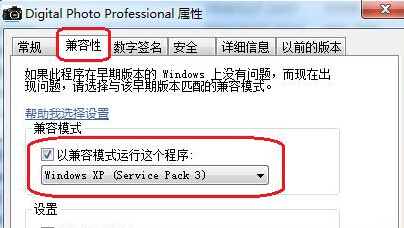
Windows 7 執行 Canon Digital Photo Professional (DPP) 時若彈出 「Dpp Viewer Module 停止運作」,主因是軟體版本過舊與系統相容性不佳。可透過設定相容模式解決。
設定完成後重新啟動 DPP,錯誤即可排除。建議並行更新至最新版 DPP 以獲得最佳相容性。
Win7 關閉開機音效:讓電腦啟動更安靜
Win7 開始選單程式捷徑路徑查詢:右鍵屬性→目標欄位/開啟檔案位置一鍵直達
Windows 7 快速開啟「系統屬性」四大方法
Win7 误删桌面「傳送到」選單項目恢復技巧:SendTo 資料夾重建捷徑
Windows 7 照片檢視器變慢?罪魁禍首是「校正色彩」產生的 ICC 設定檔
將 Windows 7 VHD 虛擬硬碟轉換為 ISO 安裝映像檔
Win7 64 位元頻彈「com surrogate 已停止運作」?DEP 排除 dllhost.exe 解決
Windows 7 主要功能改進一覽:超級任務列、程式庫、HomeGroup、觸控、UAC 滑桿、相容性保障