Windows XP Windows 7 Windows 2003 Windows Vista Windows 綜合教學 Linux 系統教學
Windows 10 Windows 8 Windows 2008 Windows NT Windows Server 電腦軟體教學

Win7 桌面圖示變白底怎麼辦?一鍵重建圖示快取修復

編輯:Windows 7 系統介紹

Windows 7 桌面圖示突然變成白底(空白圖示),通常是 圖示快取檔案損毀 所致。透過命令提示字元清除快取並重啟總管即可快速修復。

修復步驟

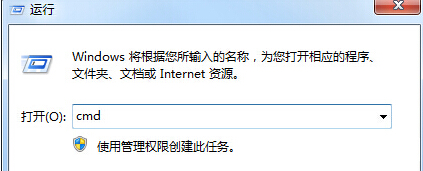
  1. 按 Win + R 開啟「執行」,輸入 cmd 按 Enter 開啟命令提示字元。
  2. 開啟命令提示字元
  3. 依序輸入以下指令,每行按 Enter:
taskkill /im explorer.exe /f
cd /d %userprofile%\AppData\Local
del iconcache.db /a
start explorer.exe
exit
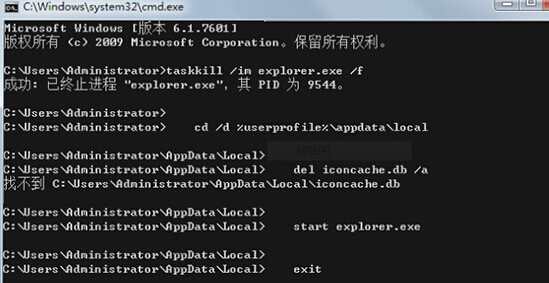
執行修復指令畫面

指令說明:先強制結束總管進程,刪除 iconcache.db 快取檔,再重新啟動總管。執行完成後桌面圖示即可恢復正常顯示。

Copyright © Windows教程網 All Rights Reserved