Windows XP Windows 7 Windows 2003 Windows Vista Windows 綜合教學 Linux 系統教學
Windows 10 Windows 8 Windows 2008 Windows NT Windows Server 電腦軟體教學

修改 Win7 系統預設快捷鍵:使用 eXeScope 編輯 shell32.dll

編輯:Windows 7 系統介紹

原理

Win7 大部分系統級快捷鍵定義儲存在 C:\Windows\System32\shell32.dll 的「加速器」資源區段。直接修改此系統檔需離線替換 (WinPE 環境)。

操作流程

  1. 備份 shell32.dll 至其他位置。
  2. 使用 eXeScope (資源編輯器) 開啟備份檔。
  3. 左側樹狀圖展開「資源」→「加速器」,子項 1、2、3... 對應不同快捷鍵表。
  4. 右側欄位說明:次鍵, 編碼, virtkey, 主鍵。
    例:Ctrl+X 顯示為 X, 28696, virtkey, Control。
  5. 修改目標快捷鍵:將次鍵改為 F10,移除主鍵 Control,編碼保持,變為 F10, 28696, virtkey。
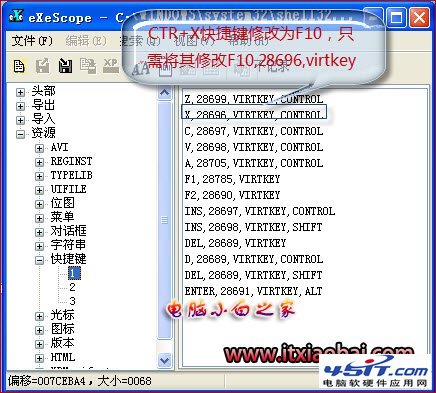
  6. 「編輯」→「儲存更新」產生修改後的 DLL。
  7. 進入 WinPE (安裝光碟修復模式/PE 隨身碟),以系統權限覆蓋 C:\Windows\System32\shell32.dll。
  8. 重開機生效。

⚠ 高風險警示

  • shell32.dll 為核心系統檔,修改錯誤會導致介面崩潰、無法開機。
  • 嚴禁使用已存在的熱鍵組合 (如 Ctrl+C/V/Z、Win+E 等),會造成系統衝突。
  • 建議改用 AutoHotKey 腳本重新映射熱鍵,無需修改系統檔、風險極低、支援條件判斷、攜帶方便。
Copyright © Windows教程網 All Rights Reserved