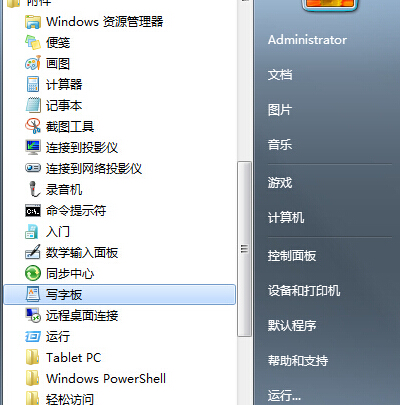
Windows 7 內建的「寫字板」是一款輕量級文字編輯工具,適合不習慣使用輸入法或需快速編輯純文字的使用者。以下提供兩種最快開啟方式:
wordpad
即可直接啟動寫字板,無需層層點選選單。
Win7 Aero玻璃效果深度自訂:AeroTuner小工具調色/發光/模糊/條紋全參數微調
Win7 刪除不再使用的使用者帳號圖解教學
Win7 筆電螢幕亮度調節四大法:工作列、控制台、Fn熱鍵、Win+X行動中心
Win7 Aero Shake 搖晃視窗最小化其他視窗:專注單一作業的直覺手勢
Win7 更新失敗提示「設定 Windows 更新失敗」?清理軟體發佈資料夾並暫停非 Microsoft 服務解決
Win7 開機提示「Windows 找不到檔案或沒有關聯的程式」?修復登錄檔管理工具指令即可
Win7 登錄找不到 msahci 項目?搜尋功能定位或手動新建教學
Win7 硬碟運轉噪音大解決辦法:調整電源選項