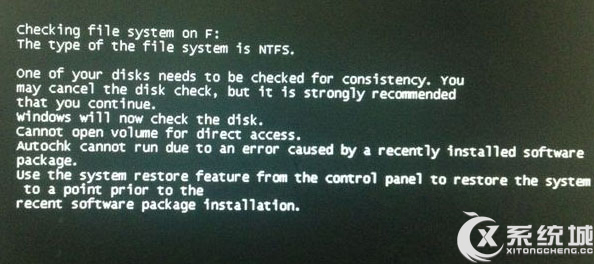
提供自動與手動兩種磁碟修復方式。
若為實體壞軌,可嘗試 NDD、Scandisk 等工具。若無效,建議還原系統、重灌、重新分割磁碟,最終須更換硬碟。
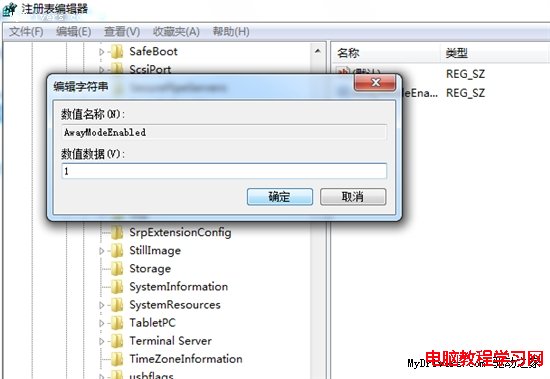
開啟 regedit,定位 HKEY_LOCAL_MACHINE\SYSTEM\CurrentControlSet\Control\Session Manager,清空 BootExecute 數值資料(先備份)。
regedit
HKEY_LOCAL_MACHINE\SYSTEM\CurrentControlSet\Control\Session Manager
BootExecute
Win7 自檢功能強大,耐心等待通常即可完成修復。
Windows 7 無法加入家庭群組:電腦名稱衝突、網路位置、共用設定完整排查
Win7 調整跳躍清單最近使用項目顯示數量,打造專屬高效開始選單
Windows 7 直接查看已連線無線網路密碼:無需管理員也能獲取
Win7檔案總管輸入字母跳至搜尋框修復:資料夾選項恢復「在檢視中選取輸入項目」
Ed Bott 揭密 Windows 7 安裝過程七大祕訣:從選項選擇到非破壞性全新安裝
Win7 旗艦版如何禁用 NetMeeting 白板程式?組策略一鍵關閉
Vista系統22大常見問題解決方案:關閉UAC、備份還原、碟片整理、電源管理全攻略
Win7 IE9 收藏夾無法使用?重設 Internet Explorer 設定恢復功能