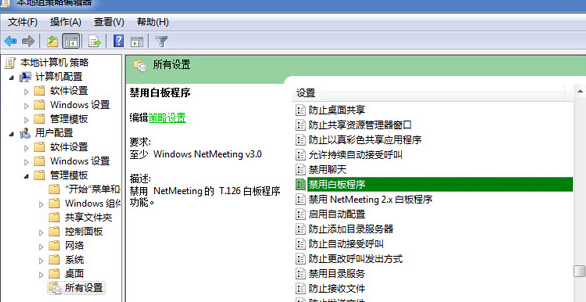
Windows 7 內建的 NetMeeting(網路會議)包含白板功能,若不需使用,可透過組策略編輯器將其禁用,減少資源佔用。
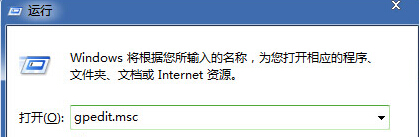
gpedit.msc
設定生效後,NetMeeting 中的白板功能將無法使用。若需恢復,將該設定改為「未設定」或「已停用」即可。
Win7 撥號成功卻無法開網頁?三大現象對應解法(TCP/IP 重裝、Modem IP、IE 分級審查)
Win7 64 位元 exFAT 格式磁碟無法寫入?chkdsk 修復檔案系統
Win 7 「執行」命令大全與高效操作指南
Windows 7 激活失敗 0xC004E003 完整解決方案:還原 Tokens、導入憑證、替換金鑰、SFC 修復四大核心修復法
Windows 7 設定印表機共享完整步驟:啟用 Guest、共享設定與網路探索
Windows 7 常見系統故障綜合解決方案:收藏夾失效、總管不載入、網路印表機、檔案被佔用、光碟機不讀碟
Win7 建立無法被刪除的資料夾:CMD 特殊命名技巧
Win7 Windows Update 更新失敗循環解決:清除 DataStore