控制孩子上網時間、下載完成自動關機、省電環保,Windows 7 內建 shutdown 指令即可輕鬆實現定時關機,無需第三方軟體。
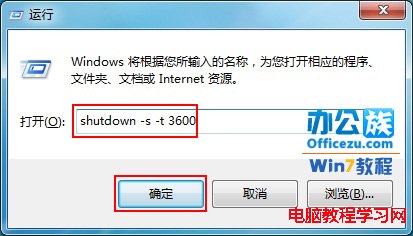
1. 按 Win + R 開啟「執行」,輸入:
shutdown -s -t 3600參數說明:
• -s:關機
• -t 3600:倒數秒數(3600 秒 = 60 分鐘 = 1 小時)
• 2 小時請用 7200,30 分鐘用 1800,依需求調整。

2. 按確定,通知區提示「Windows 將在 60 分鐘後關機」。

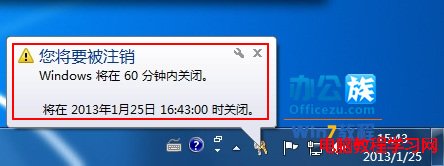
shutdown -a:取消已排程的關機shutdown -r -t 0:立即重新開機shutdown -h:休眠shutdown /f:強制關閉應用程式(配合 -s 使用)進階:建立捷徑或批次檔(.bat)置於桌面,雙擊即可一鍵定時關機。搭配工作排程器可實現每日固定時間自動關機。
Windows 7 視窗智慧顯示技巧:並排比對、搖晃最小化、拖曳最大化與桌布自動輪播
Win7 因電源管理導致網路頻繁斷線?關閉網卡「允許電腦關閉此裝置以節省電源」恢復穩定
Ghost Windows 7 安裝出現 "a destination volume could not be locked (641)" 解決方案
Win7任務列按鈕不合併設定:還原XP風格「任務列滿時才合併」避免遊戲切換誤觸
高規格電腦 Windows 7 SP1 可在 10 秒內開機 微軟效能分析指南
微軟因盜版問題忽視 Win 7 升級故障?分析師指信任危機才是核心