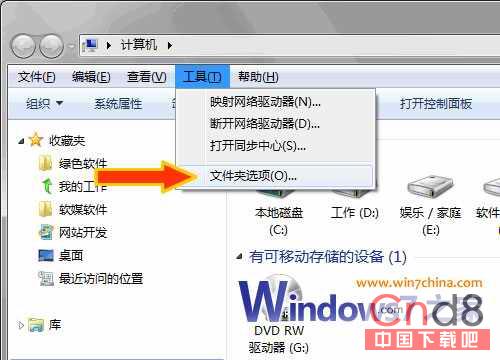
Win7 資源管理器左側導覽列預設隱藏「回收站」、「控制台」等項。找回方法:
導覽列即刻恢復完整樹狀結構,回收站、控制台、網路位置一覽無遺,定位操作更直觀。
關閉 Windows 7 視窗靠近螢幕邊緣自動最大化功能
Win7 開機假死排查:拒用精簡版系統、適度優化、檢查超頻與硬體相容
Win7 安裝 IPX 協定支援舊遊戲聯機?從 XP 提取 8 個核心檔案手動部署全記錄
Win10 設定 256 色相容模式執行舊程式?屬性相容性頁籤勾選簡化色彩模式
Win7 光碟機無法讀取自燒光碟?關閉 Shell Hardware Detection 服務即時修復
Windows 7 安裝與移除完整指南:從升級安裝到乾淨重灌
Win7 開啟 Excel 提示「沒有附加數位簽章的可信憑證」?降低巨集安全性等級
Win7 遊戲搖桿/手把設定與測試:裝置和印表機→遊戲控制器屬性校準