Windows 7 拖曳視窗至螢幕邊緣會自動最大化(上方全螢幕、左右半螢幕)。若覺得干擾,可透過登錄檔關閉。
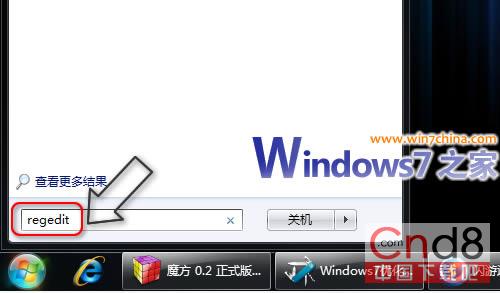
regedit
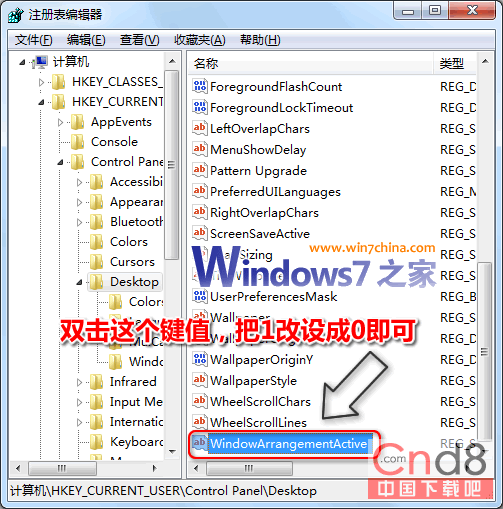
HKEY_CURRENT_USER\Control Panel\Desktop
WindowArrangementActive
1
0
登錄編輯器路徑
修改 WindowArrangementActive 數值
軟媒 Windows 7 優化大師 1.11 版將內建此選項,11 月 10 日釋出。
盜版 Windows 7 暗藏木馬軍團,360 揭露下載站掛馬與捆綁風險
Windows 7 選單列無法自動隱藏?教你恢復預設行為
修復 Windows 7 開機動畫消失(被 Vista 動畫取代)問題
Windows 7 任務列取消合併:還原 XP 風格獨立按鈕,或僅在滿時合併
在 Windows 7 為隨身碟建立加密分區:迅軟 U 密免費綠色軟體實測
Win7 資源管理器導覽窗自動展開資料夾,告別手動點擊
Windows 7 上市一個月市佔率近乎翻倍 成長迅猛
XP 升級 Win7 後聲音雜音/破音完美解決:舊版驅動 (Realtek 2.15) 實測有效