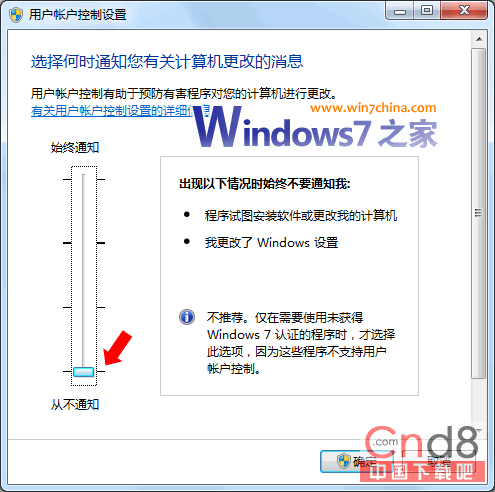
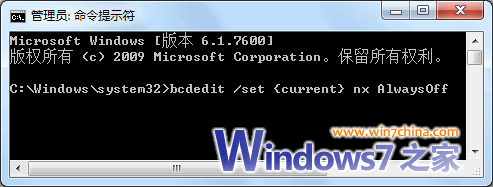
企業從 XP 升級 Win 7 後,QC 登入頁面 ActiveX 元件下載失敗,導致系統無法使用。解決方案:關閉 UAC 與 DEP。
UAC
bcdedit /set {current} nx AlwaysOff
UAC 設定介面
CMD 執行 DEP 關閉指令
Win7 安裝後出現 200MB 隱藏分區?正確刪除與修復開機完整教學
Win7 有線網路優先順序設定:介面卡綁定順序調整讓有線優先於無線
Win7 如何關閉智慧卡服務?群組原則停用四項智慧卡原則教學
Win 7 關閉自動安裝驅動程式:避免萬能驅動蓋過專屬驅動,手動掌控硬體相容性
Win7 檔案刪不掉?自製批次檔強制粉碎刪除
Windows 7 首次公開亮相:2008 年 D6 大會與 WinHEC 2008 北京展示
Windows 7 啟用 IIS ASP/ASP.NET 功能支援經典網站開發
Windows 7 安全模式妙用:刪除頑固檔案、徹底殺毒、系統還原一鍵搞定