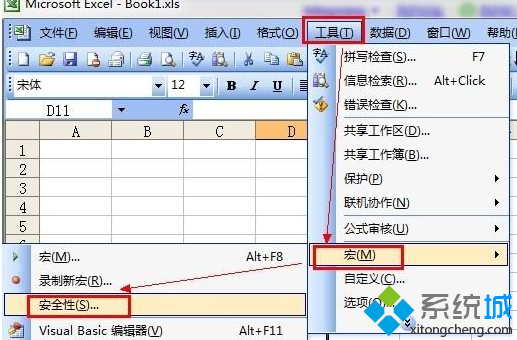
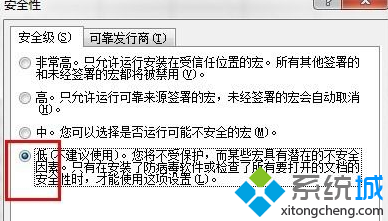
Excel 開啟檔案提示「沒有附加數位簽章的可信憑證」,是巨集安全性設定過高導致。
注意:降低安全性可能允許惡意巨集執行,僅在信任來源檔案時使用,用畢建議改回「中」或「高」。
教你一招:給 Windows 7 登入加一道安全門——強制 Ctrl+Alt+Del
Windows 7 假死/資源管理器無回應兩大主因與解決方案
用 Rainmeter 美化 Win7 桌面:超越 Mac 的資訊型桌面客製化
微軟認證輔導:Windows 7 透過「開啟/關閉 Windows 功能」完整移除 IE8
Win7如何調整任務欄預覽縮圖大小/清晰度?註冊表新建MinThumbSizePx設置像素寬度
Win7 系統播放 MKV 高清影片:修改 DirectShow 優選解碼器登錄表
Win7 搜尋功能消失?兩種常見原因與解決方法
Win7 藍牙連接手機、滑鼠完整圖文教學:配對、檔案傳輸、撥號、音訊播放