Windows 10 版本號 (如 10.0.10240.16384) 隱藏於系統資訊中,最快查詢法:**`Win`+`R` → 輸入 `dxdiag` → 回車 →「系統」頁籤 →「作業系統」行尾即為版本號**。
圖文步驟
- 開始按鈕右鍵 →「執行」 (或 Win+R)。
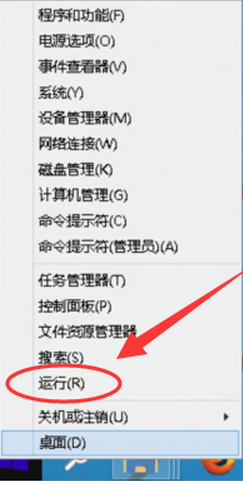
- 輸入 `dxdiag` →「確定」。

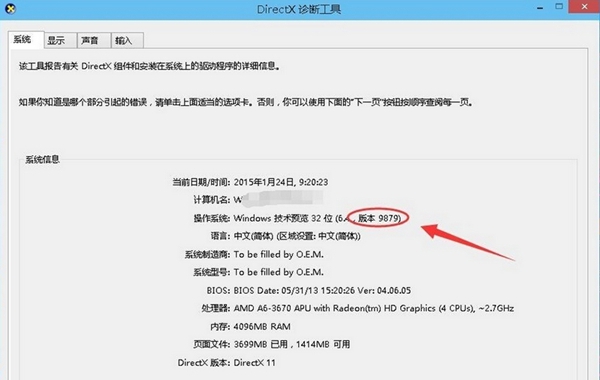
- DirectX 診斷工具 →「系統」頁籤 → 找到「作業系統」欄位,末尾數字即為版本號 (例:`10.0.10240 Build 10240`)。
補充:其他查詢方式
- `Win`+`R` → `winver` → 彈窗顯示版本/建置編號 (最直觀)。
- 「設定」→「系統」→「關於」→「Windows 規格」區塊。
- 命令提示字元執行 `systeminfo | findstr /B /C:"OS Name" /C:"OS Version"`。
💡 版本號意義:`10.0` = NT 10.0 核心;`10240` = RTM 正式版;`10586` = 1511 更新 (Threshold 2);`14393` = 1607 週年更新 (Redstone 1)……以此類推。