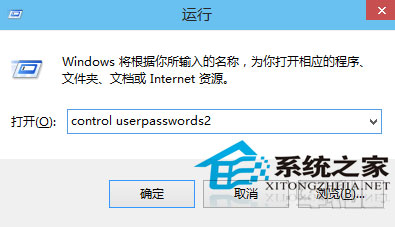
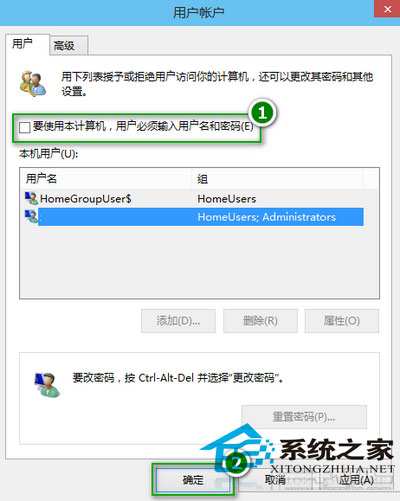
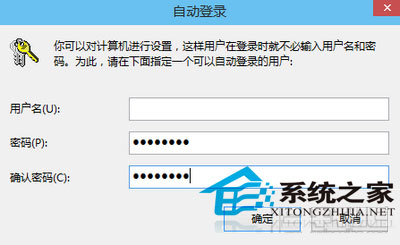
Windows 10 設定複雜密碼後若想取消開機輸入,可透過「使用者帳戶」控制面板設定自動登入。
control userpasswords2
netplwiz
重新開機後自動登入桌面。注意:自動登入降低實體存取安全性,建議僅限個人私人電腦使用。
Windows 10 10041 應用程式無聲音?停用音效增強功能修復
Win10 藍畫面錯誤代碼不見了?修改登錄讓藍畫面顯示詳細錯誤資訊
Windows 10 徹底清空資源回收筒釋放磁碟空間的方法
Win10 設定開機啟動項:工作管理員「啟動」分頁一鍵停用,開機加速神技
Windows 10 Technical Preview 輸入 Windows 8.1 產品金鑰導致系統顯示異常怎麼辦?
Win10 週年更新凍結死機?SSD 系統盤+資料盤分離觸發 Bug,暫時解決方案
Win10 桌面顯示「網路」圖示 (舊稱網上鄰居) 設定教學
Windows 10 專業版/家用版啟用 Windows To Go 功能(需外部工具)