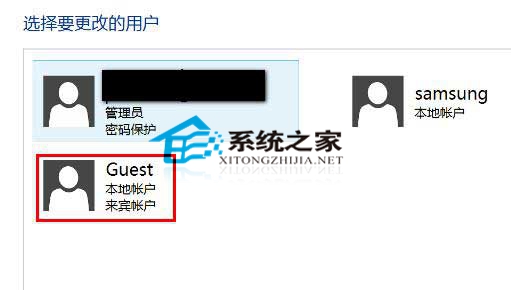
想讓他人僅能用來賓帳戶登入?設定開機停在用戶選擇畫面:
之後開機將停留在選擇用戶介面,也可為來賓帳戶設定密碼,僅告知授權者使用。
Windows 10 查看電腦配置(CPU、記憶體、顯卡)兩大內建方法
Win10 Microsoft Edge (斯巴達瀏覽器) 停用 Adobe Flash Player:設定介面一鍵關閉
Windows 10 系統下印表機無法列印?完整排除故障步驟
Windows 10 一鍵隱藏所有桌面圖示技巧
Windows 10 設定或取消開機登入密碼完整教學(含 netplwiz 進階法)
Win10 1607 版工作列快捷圖示消失?卸載 360 安全衛士即可恢復
如何下載 Windows 10 官方中文版 ISO(加入 Windows Insider 計畫)
如何屏蔽 Win10 升級推播?註冊表 DisableGwx 值一鍵關閉 GWX 通知