Windows XP Windows 7 Windows 2003 Windows Vista Windows 綜合教學 Linux 系統教學
Windows 10 Windows 8 Windows 2008 Windows NT Windows Server 電腦軟體教學

Win10 關閉內建定位功能:控制台 → 位置設定 → 關閉 Windows 定位平台

編輯:Win10 系統應用技巧

Win10 預設開啟裝置定位服務,供地圖、天氣、Cortana、網頁地理定位 API 使用。關注隱私者可全域關閉或個別應用授權。
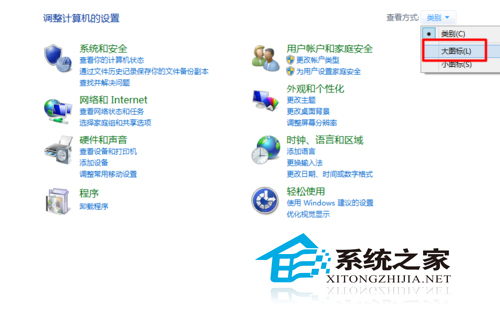
全域關閉步驟

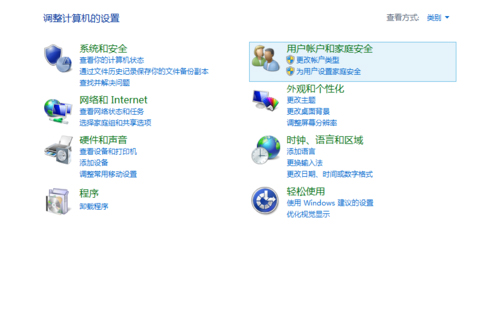
  1. 控制台 → 檢視模式「大圖示」 → 「位置設定」 (或設定 → 隱私權 → 位置)。
  2. 「變更」按鈕 → 將「此裝置的位置服務」切換為「關閉」。
  3. 或設定頁直接關閉「允許應用程式存取您的位置」總開關。
控制台位置設定 大圖示檢視

個別應用授權 (建議折衷方案)

  • 保持全域開啟,在「選擇哪些應用程式可以存取您的確切位置」列表中,僅為地圖、天氣、行車導航等必要應用開啟開關。
  • Cortana、瀏覽器、社群軟體等非必要定位應用關閉。
  • 「位置歷程」定期清除:設定 → 隱私權 → 位置 → 「清除位置歷程」。

企業環境群組原則

Computer Configuration → Administrative Templates → Windows Components → Location and Sensors → Windows Location Provider → 「Turn off location」啟用,強制全域關閉所有使用者定位。

定位服務屬隱私敏感資料,依「最小權限原則」僅授權必要應用,或全域關閉並改用手動輸入地址/郵遞區號查詢天氣、地圖。

Copyright © Windows教程網 All Rights Reserved