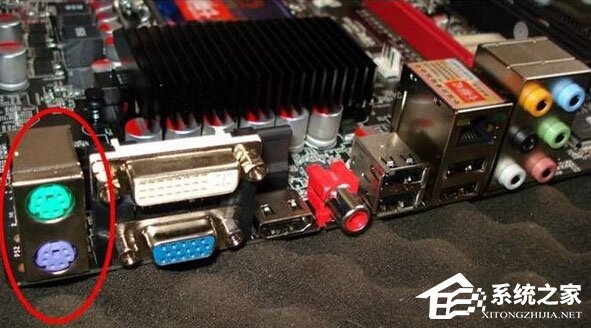
Windows 10 執行《鬼泣 4》多鍵同按時鍵盤失靈,實測為 USB 鍵盤與遊戲相容性問題。解決方法:換用 PS/2 介面鍵盤 (主機板需有 PS/2 埠),關機狀態下插入 PS/2 鍵盤再開機即可完美解決。
前提:主機板需具備 PS/2 連接埠;熱插拔 PS/2 鍵盤無效,必須關機插入。
Win10 遊戲/程式提示缺少 xinput1_3.dll 解決:安裝 DirectX 執行階段
Windows 10 刪除自訂字型的操作步驟
Win10 IE 無法使用?同 1126 三大方案:重置 Winsock、調整網際網路選項代理設定、建立新管理員帳號
本機硬碟直接安裝 Windows 10 教學:使用 NT6 HDD Installer 工具
Windows 10 「音樂」應用新增本地音樂資料夾:建立個人音樂庫
Win10 系統 Office 2016 激活指南:官方預覽版序列號 / KMS 工具 / 購買正版
Windows 10 IE 瀏覽器關閉時自動清除暫存檔:釋放磁碟空間
Win10 內建虛擬印表機輸出 PDF?Microsoft Print to PDF 三步驟快速轉檔