無光碟機、無 USB 時,可使用 NT6 HDD Installer 在現有系統下直接安裝 Windows 10 (硬碟安裝)。
準備工作
- 下載 NT6 HDD Installer (硬碟安裝工具)。
- 下載 Windows 10 ISO 映像檔。
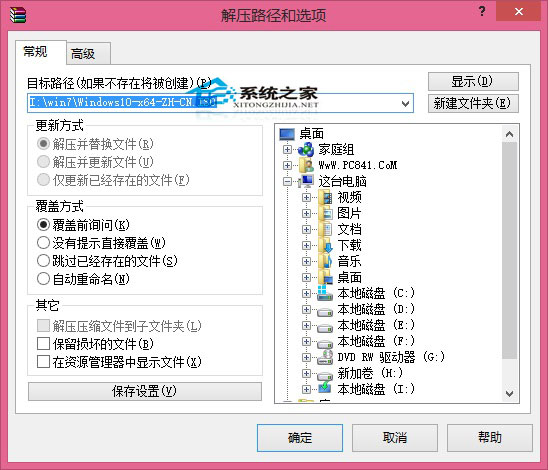
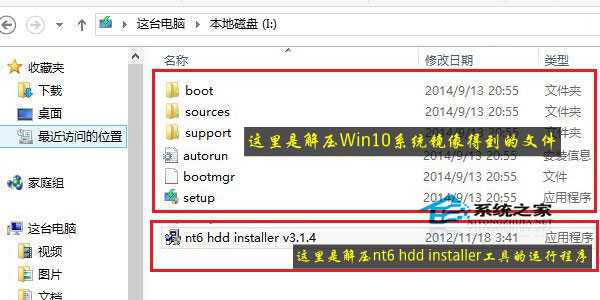
- 將兩者解壓至同一磁碟根目錄 (如 D:\),確保 ISO 解壓後的
sources、boot 資料夾與 NT6 HDD Installer 執行檔在同層。
安裝步驟
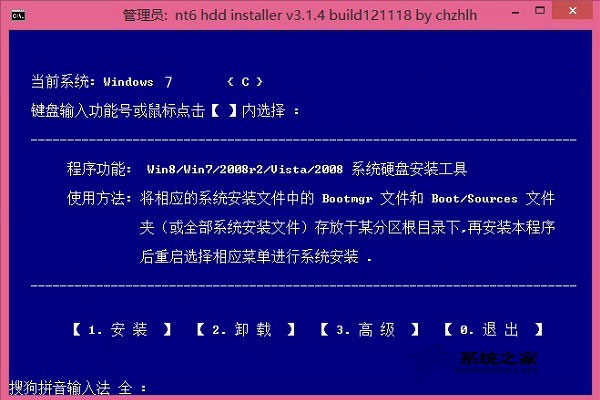
- 以系統管理員身分執行
NT6_HDD_Installer.exe。
- 點選「安裝」,工具會配置開機項目並重新開機進入 Windows 安裝程序。
- 後續安裝步驟同一般安裝,選擇目標分區 (不可為解壓映像檔所在分區) 安裝。
注意:安裝前請備份重要資料,硬碟安裝有一定風險。