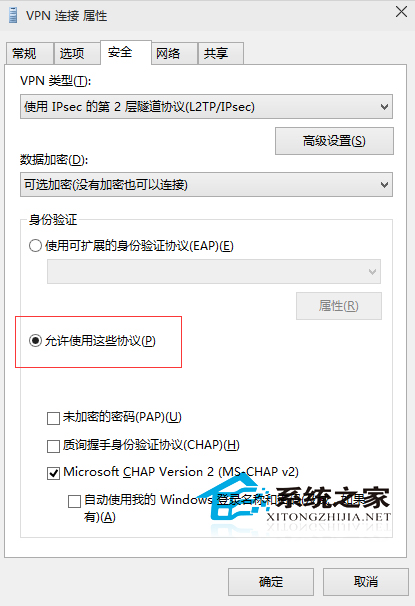
從 Windows 7 習慣帶入 Windows 10 的 VPN 設定,常因「安全性」分頁的驗證選項未正確勾選,導致連線跳出「偵錯程式已終止執行緒」等錯誤。修正方法非常簡單。
ncpa.cpl
完成後,VPN 應能正常建立通道。若仍失敗,檢查防火牆/防毒軟體是否阻擋 GRE (47) 或 UDP 500/4500 連接埠。
Windows 10 開啟傳統「通知區域圖示」設定介面的隱藏指令
Win10 更新無線網卡驅動程式 兩步自動搜尋安裝
Win10 如何關閉觸控鍵盤/觸控板圖示?任務列右鍵一鍵隱藏
Windows 10 開啟蜘蛛紙牌與纸牌遊戲完整教學
Win10 右鍵選單新增「加密」選項(註冊表 EncryptionContextMenu)
Win10 滑鼠叫不出右側邊欄?一鍵熱鍵 Win+C 秒開操作中心
Win10 升級後聲音忽大忽小?驅動程式衝突完整解決方案
Win10 禁止 TeamViewer 開機自動啟動:選項取消勾選隨 Windows 啟動