Windows XP Windows 7 Windows 2003 Windows Vista Windows 綜合教學 Linux 系統教學
Windows 10 Windows 8 Windows 2008 Windows NT Windows Server 電腦軟體教學

Win10 10056 透過 Windows Update 升級 10061:修改登錄 SelfHost 設定

編輯:Win10 系統應用技巧

安裝洩露版 Win10 10056 後無法透過 Windows Update 直接升級 10061。修改登錄 WindowsSelfHost\Applicability 相關鍵值可切換更新通道獲取官方推送。

登錄修改步驟 (操作前請備份登錄)

  1. Win+R → regedit 開啟登錄編輯器。
  2. 定位至:
    HKEY_LOCAL_MACHINE\SOFTWARE\Microsoft\WindowsSelfHost\Applicability
  3. 修改右側數值:
  • BranchName → fbl_impressive
  • ThresholdRiskLevel → low
  • Ring → WIF
  • ThresholdOptedin → 00000001
  • ThresholdInternal → 0
  1. 以系統管理員身分開啟「命令提示字元」依序執行重啟更新服務:
net stop wuauserv
net stop bits
net start bits
net start wuauserv
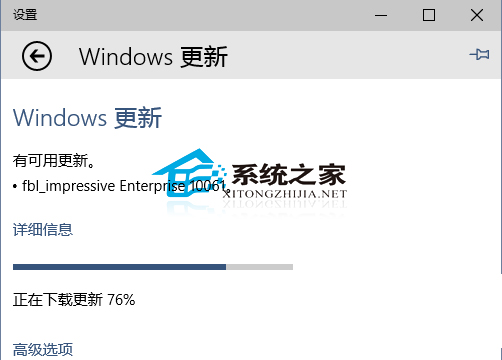
  1. 「設定」→「更新與安全性」→「Windows Update」→「檢查更新」,即可偵測並下載 10061 升級。

登錄 WindowsSelfHost Applicability

風險提醒: 修改 SelfHost 登錄屬非官方支援操作,可能導致系統不穩定或接收不穩定版本。建議重要資料備份後操作,或直接下載 10061 ISO 全新安裝更穩妥。

Copyright © Windows教程網 All Rights Reserved