Windows XP Windows 7 Windows 2003 Windows Vista Windows 綜合教學 Linux 系統教學
Windows 10 Windows 8 Windows 2008 Windows NT Windows Server 電腦軟體教學

Win 10 Firefox Flash 外掛崩潰?關閉 Firefox 內建保護模式 (dom.ipc.plugins.flash.disable-protected-mode=true)

編輯:Win10 系統應用技巧

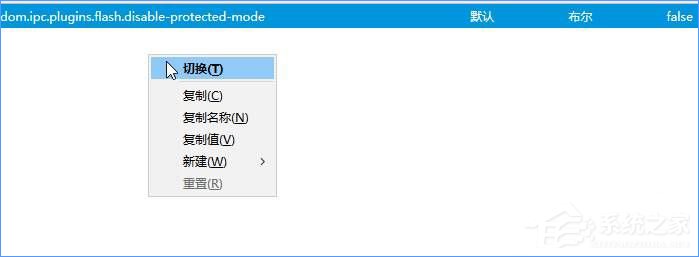
Firefox 內建 Flash 保護模式與部分網頁衝突導致崩潰。進入 about:config 設定 dom.ipc.plugins.flash.disable-protected-mode = true 即可停用保護模式,解決崩潰問題。

步驟

    1. 網址列輸入 about:config?filter=dom.ipc.plugins.flash.disable-protected-mode → 我保證會小心。
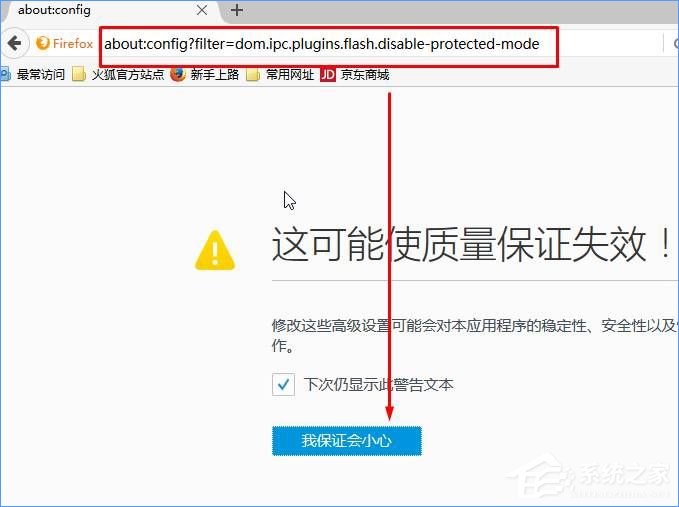
    about:config 進入 2. 該項目右鍵 → 切換,數值變為 true。
    切換為 true

說明

此設定僅影響 Firefox Flash 外掛,不影響系統其他瀏覽器。若未來 Firefox 移除 Flash 支援,此設定將失效。

Copyright © Windows教程網 All Rights Reserved