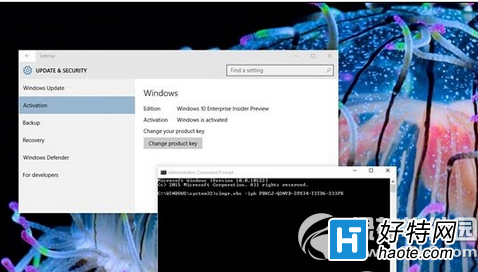
升級 10122 後出現啟用浮水印,微軟提供指令修復:
slmgr.vbs -ipk PBHCJ-Q2NYD-2PX34-T2TD6-233PK
此為預覽版通用金鑰(GVLK),正式版請使用正規授權。
Win10 工作管理員選單列不見?點一下「詳細資料」立即恢復完整介面
Windows 10 ISO 映像檔如何安裝?UltraISO 燒錄 USB 隨身碟→BIOS 設定啟動→完整圖文安裝流程
Win10 關閉 UAC 使用者帳戶控制:降低權限提示頻率但降低安全性
Win10 開機黑畫面 30 秒?進入 WinRE 停用獨立顯卡驅動或啟用低解析度模式解決驅動衝突
Win10 磁碟機出現兩個小人圖示?關閉磁碟共享移除共用標識教學
如何阻止 Windows 10 強制更新驅動程式?
Win10 將回收站釘選到「快速存取」側邊欄技巧(詳細版)
Windows 10 磁碟 100% 佔用?卸載 Intel RST 驅動程式嘗試緩解