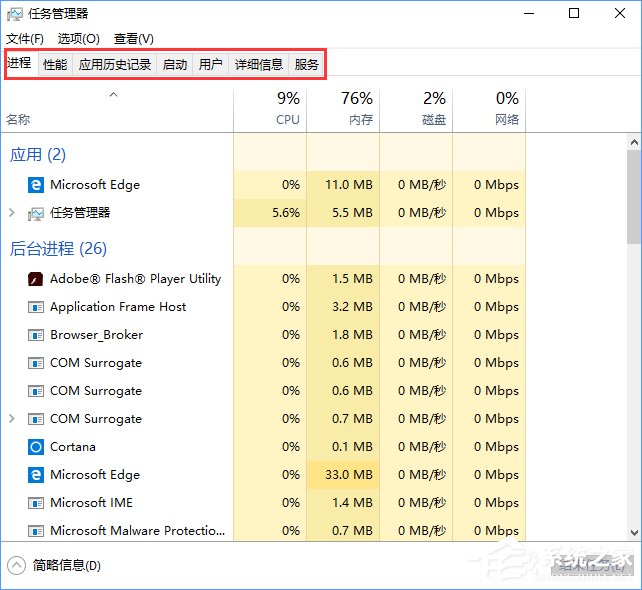
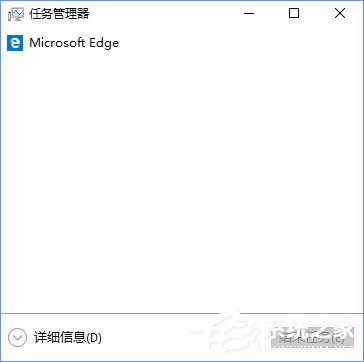
Windows 10 工作管理員預設可能以簡易模式開啟,缺少選單列與索引標籤。只需點擊左下角「詳細資料」按鈕,即可切換回完整模式。
此為介面切換設計,非故障。若誤關閉欄位,亦可在「檢視」選單勾選所需欄位。
Win10 無法執行 WWE 2K16?遊戲需 32 位元系統,三種替代方案
Win10 設定 16 位色模式降低系統負擔
Lumia 950 XL 攝影實測:2000 萬畫素 PureView、三色溫閃光燈、4K 錄影旗艦級表現
Win10 系統優勢全解析:升級 Win10 的五大核心理由
Win10 資料夾無法重新命名?註冊表修復檔一鍵解決
Win10 喚醒源排查命令大全:查設備、查任務、精準禁用誤喚醒
安裝/升級 Win 10 Build 9879 硬碟故障?多為邏輯錯誤 數據未損 八大修復方案
UEFI 模式安裝 Windows 10 完整教學 (GPT 分區、開機順序、自動分區規則)