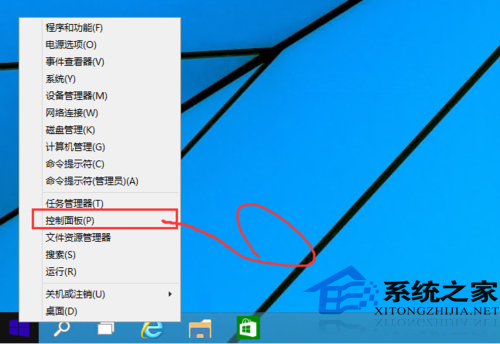
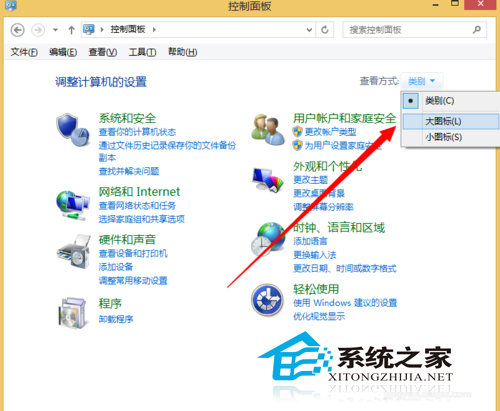
UAC 預設較嚴格,頻繁彈出權限提示,可透過控制台調整或關閉。
風險警示:關閉 UAC 後惡意軟體可在無提示下取得系統權限,極大降低安全性。建議保持預設(第二級)或僅調整至第三級(不暗化桌面),除非在受控測試環境。
Win10 找回 Win8 風格全螢幕開始畫面:開啟「使用全螢幕開始」選項教學
Windows 10 設定開機啟動聲音的啟用方法
Win10 從開始選單啟動記事本:所有應用程式 → Windows 配件 → 記事本
Windows 10 啟用 OneDrive 同步:四步驟完成雲端備份設定
Windows 10 「事件檢視器」完整使用教學:從系統日誌定位問題根因
解決 Windows 10 升級錯誤 0x80070006-0x2000C:乾淨啟動排除軟體衝突
Win10裝機量達5300萬:日均1500台/秒增速放緩
Win10 10130 聲音異常修復:變更播放裝置預設格式取樣率/位深度解決無聲音問題