執行下載程式時彈出「無法驗證發行者,確定要執行嗎?」警告,屬 Win10 SmartScreen/附件執行服務機制。若確定來源可信,可透過登錄檔新增 LowRiskFileTypes 字串值,將常見副檔名納入白名單,徹底停用該提示。
regedit 開啟登錄編輯器。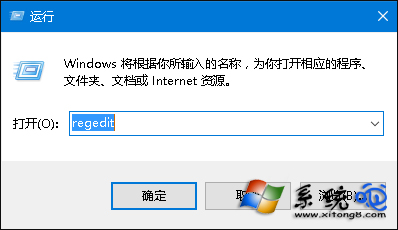
HKEY_CURRENT_USER\Software\Microsoft\Windows\CurrentVersion\Policies\AssociationsAssociations 項,於 Policies 下右鍵新增項目命名為 Associations)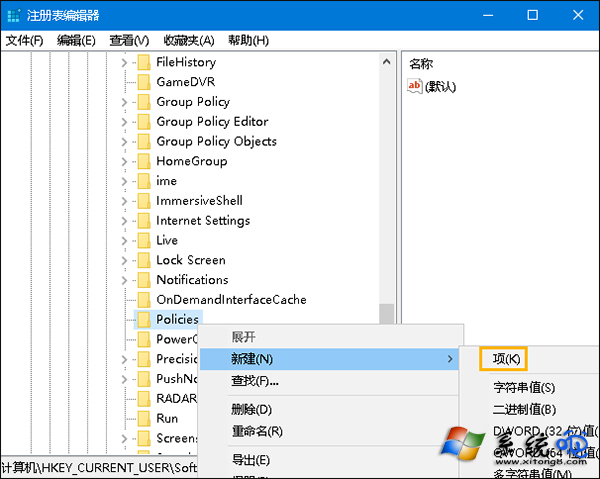
Associations 右側空白處新增「字串值」,命名 LowRiskFileTypes。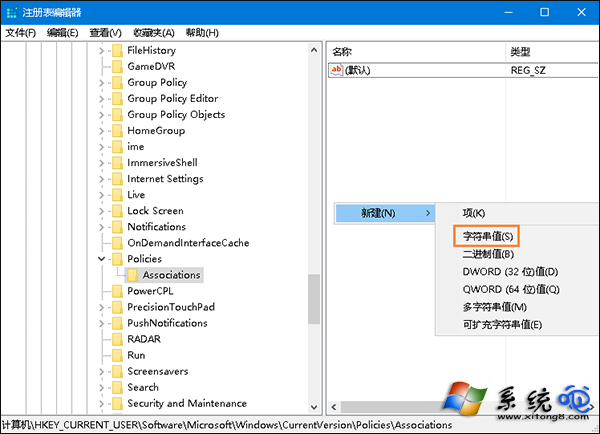
.zip;.rar;.nfo;.txt;.exe;.bat;.vbs;.com;.cmd;.reg;.msi;.htm;.html;.gif;.bmp;.jpg;.avi;.mpg;.mpeg;.mov;.mp3;.m3u;.wav;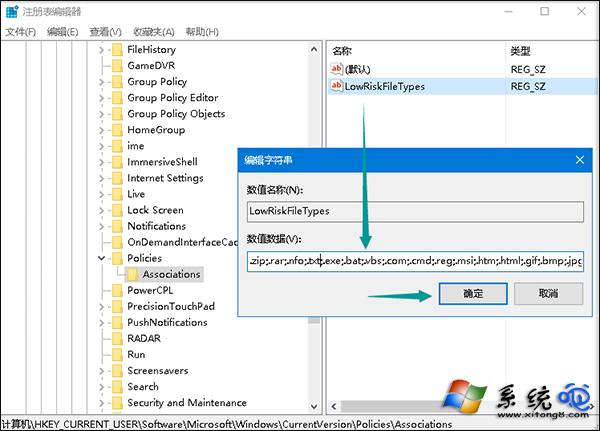
設定後,上述副檔名執行將不再彈出發行者驗證警告。風險提醒:此舉降低安全防護,請確保僅執行可信來源檔案,並維持防毒軟體即時掃描開啟。