Win10 可將 Microsoft Store 應用安裝至非 C 槽分區甚至 USB/行動硬碟:
設定新安裝位置
- 設定 → 系統 → 「儲存體」。
- 「新增應用程式將儲存位置」下拉選擇目標分區/裝置 (不支援網路磁碟)。
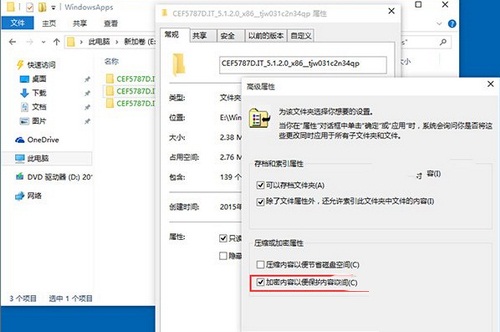
- 系統自動建立三資料夾:
- `<電腦名稱>` (使用者設定檔)
- `WindowsApps` (加密應用程式檔)
- `WpSystem` (應用資料)
遷移已安裝應用
設定變更後僅影響新安裝應用,舊應用需「移動」功能遷移 (10122 版本該功能失效,僅能解除安裝重裝)。
注意事項
- 外接裝置拔除後應用無法執行,重新插入恢復。
- `WindowsApps` 加密保護資料安全,`WpSystem` 與設定檔早期版本未加密。
- 大容量硬碟建議仍給 C 槽足夠空間,此功能對小容量平板 (32GB) 最實用。