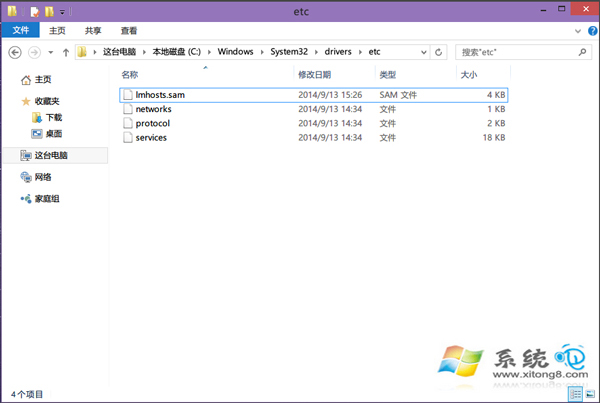
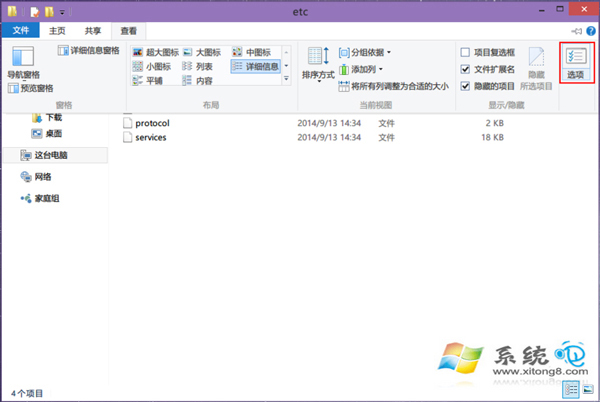
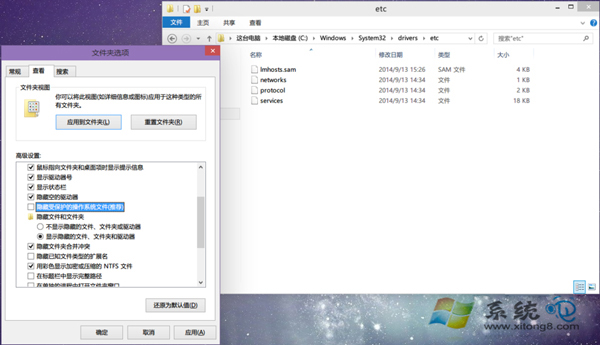
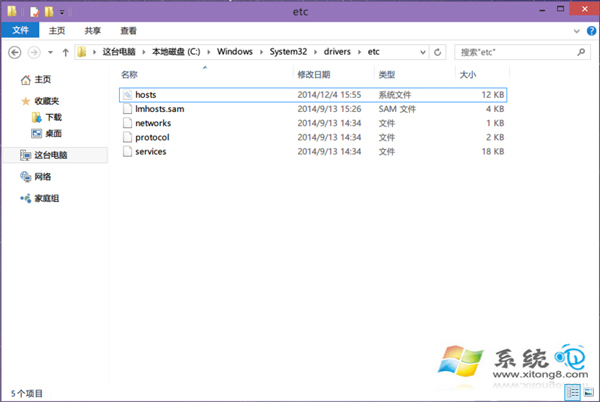
hosts 檔案位於 C:\Windows\System32\drivers\etc,作為域名與 IP 的本地對應資料庫,可加速解析。若在該目錄下看不到 hosts,通常是因為「隱藏受保護的作業系統檔案」選項開啟所致。
hosts
C:\Windows\System32\drivers\etc
修改 hosts 後記得將「隱藏受保護的作業系統檔案」重新勾選,避免誤刪關鍵系統檔案。若需編輯 hosts,請以系統管理員身分執行記事本開啟。
Win10 更新驅動程式逾時解決:調整群組原則延長安裝等待時間
Win10 設定共用資料夾教學:區域網路檔案共享
Windows 10 內建播放器 (WMP) 最小化後無聲音 Bug 暫時對策:勿最小化視窗、改調整大小
Windows 10 關閉藍牙功能兩種方法教學
Win10 關閉自動維護教學:工作排程器停用 Microsoft\Windows\TaskScheduler\TaskScheduler 任務 (附自動維護功能說明)
Win10 開機出現腳本錯誤?病毒/流氓軟體啟動項清理指南
Win10 內建計算機完整使用教學:標準、科學、程式設計師、12 種單位換算
Windows 10 變更預設瀏覽器為 Chrome/Edge/其他瀏覽器教學