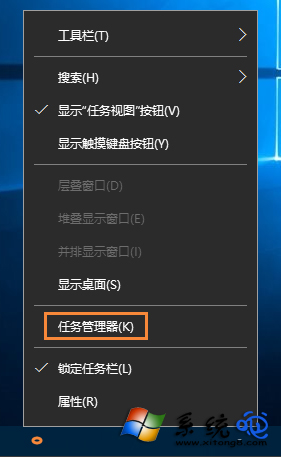
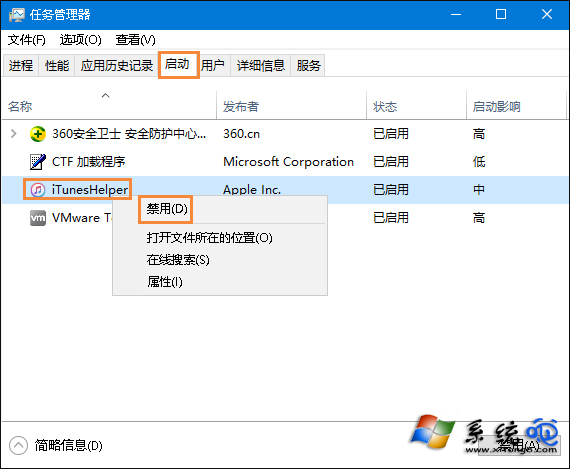
Win10 開機啟動項整合於「工作管理員」,不再使用 msconfig。直接在「啟動」頁籤右鍵停用不需自動執行的程式,加快開機速度。
msconfig
工作管理員 - 啟動頁籤
右鍵停用啟動項目
停用非必要啟動項目可顯著縮短開機時間,亦可搭配第三方工具(如 Autoruns)進行更精細管理。
Win10 將常用「設定」頁面釘選到開始選單:大頭針圖示一鍵固定
Windows 10 保護隱私:關閉開始選單操作記錄、清除磚塊個人資訊、停用跳躍清單
Win10 「上帝模式」建立桌面/開始選單/工作列三大捷徑:全控制面板項目一覽
Win10 開始選單磚貼亂碼?PowerShell 重註冊應用程式套件修復
Win10 應用商店網頁版出現「Access Denied」白屏?可能是區域/網路限制,客戶端仍正常
Win10 調整「安全性與維護」(操作中心)通知設定,關閉不必要提醒
Win10 如何對應網路磁碟機?CMD 開啟共享 → 右鍵「對應網路磁碟機」分配磁碟代號
Win10 啟用 Telnet 用戶端:控制台 > 程式和功能 > 開啟或關閉 Windows 功能 勾選安裝