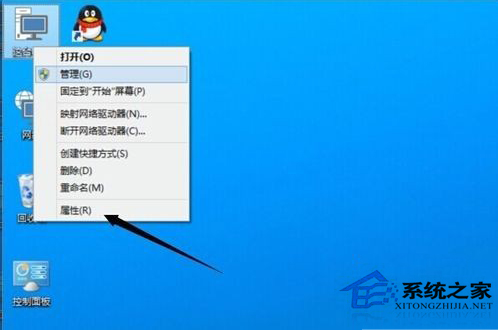
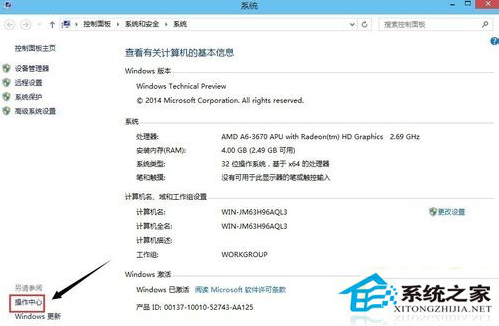
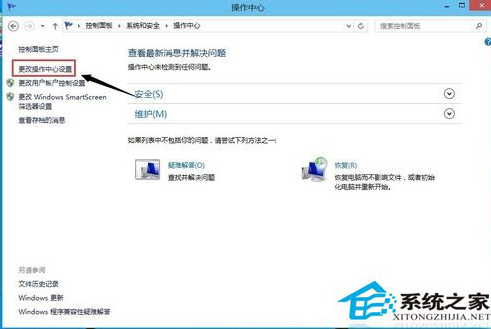
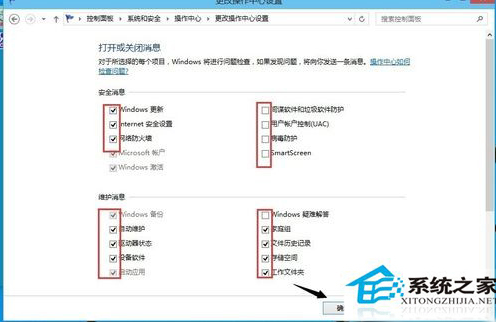
Win10「安全性與維護」(原「操作中心」)會針對防火牆、更新、備份、UAC 等發出通知。可依需求啟用/停用特定訊息來源。
此方法同樣適用於 Win7/Win8.1,集中管理系統維護提醒。
Windows 10 關閉 Microsoft 產品更新(同 ID 21054)
Win10 本地帳戶與 Microsoft 線上帳戶切換完整教學
Win10 開機報 amdxata.sys 無法驗證數位簽章?進安全模式停用強制簽章 + 重裝顯卡驅動/殺毒
Win10 開始選單與 Cortana 無法運作?教你透過服務修復快速解決
Win10 Edge 瀏覽器如何設定分頁預覽?登錄調整延遲時間或關閉功能
Windows 10 Mobile 離線地圖下載教學:出國/省流量必備,4 步驟搞定
Win10 Build 10147 Edge 瀏覽器新增深色顯示模式,UI 微調與修復漏洞趨近正式版
Windows 10 Build 10036 預覽版安裝體驗與介面變化