Windows XP Windows 7 Windows 2003 Windows Vista Windows 綜合教學 Linux 系統教學
Windows 10 Windows 8 Windows 2008 Windows NT Windows Server 電腦軟體教學

Win10 驅動程式自動更新怎麼關?專業版群組原則/家庭版登錄檔雙方案

編輯:Windows 10 系統介紹

Win10 強制自動更新驅動程式,導致不成熟驅動推送造成藍屏、效能下降。專業版可用群組原則啟用「Windows 更新不包含驅動程式」;家庭版則改登錄檔新增 ExcludeWUDriversInQualityUpdate = 1 達到同樣效果。

專業版/企業版:群組原則

  1. Win+R → gpedit.msc。
  2. 電腦設定 → 系統管理範本 → Windows 元件 → Windows Update。
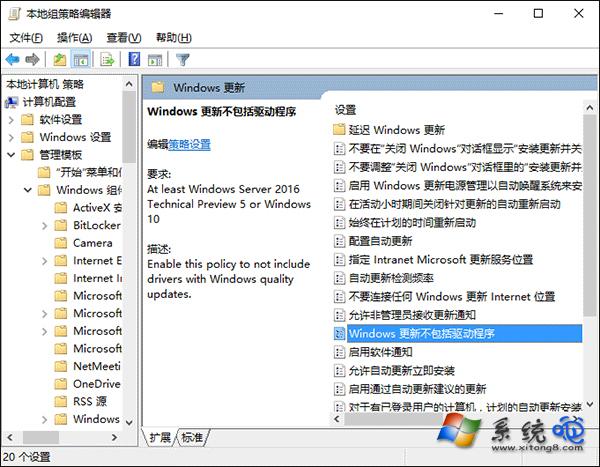
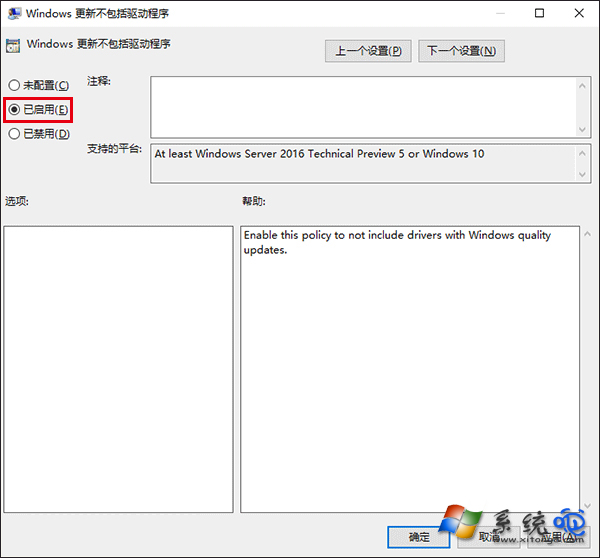
  3. 雙擊「Windows 更新不包含驅動程式」 → 「已啟用」 → 確定。

家庭版:登錄檔

  1. Win+R → regedit。
  2. 導覽/建立:
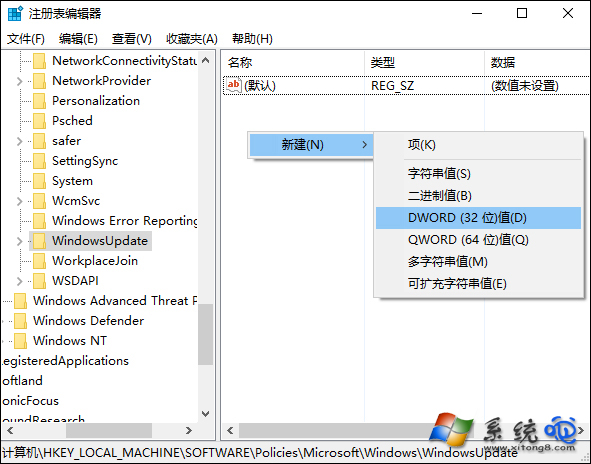
    HKEY_LOCAL_MACHINE\SOFTWARE\Policies\Microsoft\Windows\WindowsUpdate
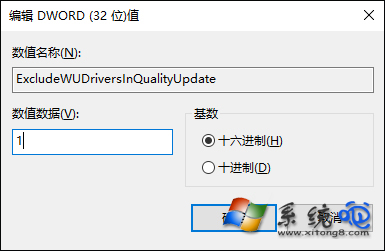
  3. 新增 DWORD (32 位元) ExcludeWUDriversInQualityUpdate = 1。
  4. 重開機生效。

啟用後,Windows Update 僅安裝安全性/品質更新,驅動程式需自行從廠商官網下載安裝,掌握主動權。建議定期手動檢查關鍵硬體(顯卡、晶片組、網卡)驅動更新。

Copyright © Windows教程網 All Rights Reserved