Microsoft Store(應用程式商店)安裝應用失敗、閃退、報錯,多數源於本地快取損毀。內建指令 wsreset.exe 可一鍵清除快取並自動重啟商店。
cmd 按 Enter 開啟命令提示字元。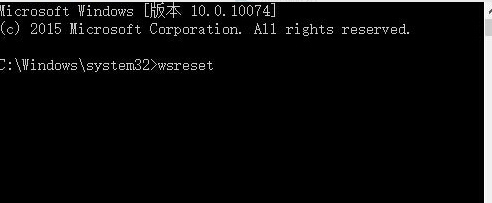
wsreset 按 Enter。wsreset 無效,可嘗試 PowerShell 管理員執行:Get-AppXPackage -AllUsers | Foreach {Add-AppxPackage -DisableDevelopmentMode -Register "$($_.InstallLocation)\AppXManifest.xml"}Win10 升級後喇叭雜音?重裝聲卡驅動與檢查 USB 干擾
Win10 筆電風扇轉速過快噪音大?改用「被動式散熱」降低風扇轉速
Windows 10 系統修復完整指南:WinRE 環境啟動、卸載更新、重置電腦、系統映像恢復
Windows 10 關閉/退出家庭群組:同 ID 23311 內容重複
Win10 經典蜘蛛紙牌在哪裡?Microsoft Solitaire Collection 完整啟用指南
Win10 設定 Ctrl 鍵切換中英文輸入法:微軟拼音選項自訂切換鍵
Win10 USB 安裝完整教學:UEFI/BIOS 雙模式支援
Win10 預覽版 ISO 鏡像整合語言包製作教學:DISM 指令掛載 WIM、加入語言包、設定預設語言、重新封裝 ISO