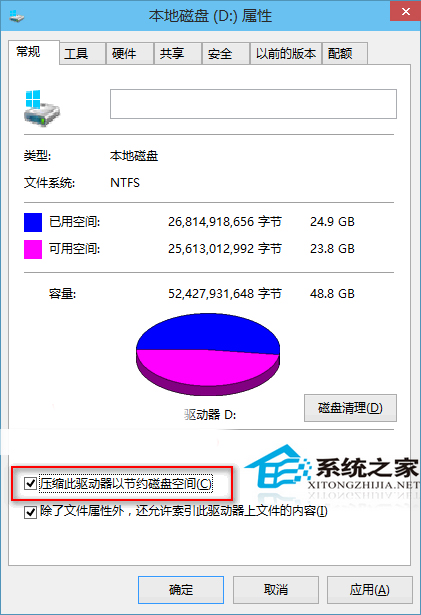
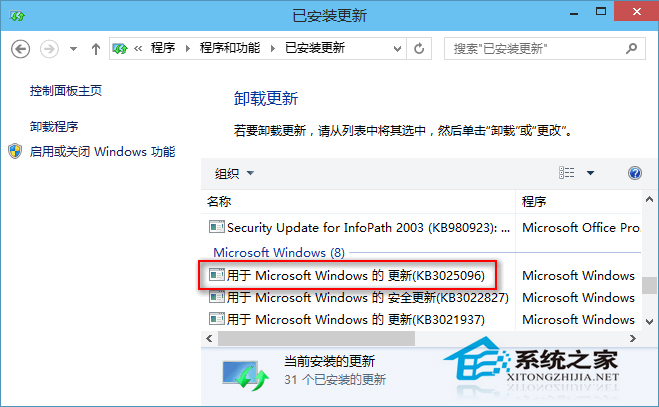
將 Windows 10 安裝於 SSD 時,系統預設啟用 NTFS 壓縮以節省空間,但會導致更新安裝器無法正確提取暫存檔,出現 0x80070005 錯誤。修正方法:
根因:壓縮功能使用檔案追蹤刪除機制,干擾更新安裝器暫存檔處理。KB3025096 修正此衝突,無需手動關閉壓縮。
Windows 10 Windows Update 無法安裝更新 (錯誤 0x80070005) 修正:SSD 壓縮功能衝突與 KB3025096 修補
Win10 QQ 瀏覽器頻繁「已停止運作」?解除安裝特定更新補丁 KB4013429 完美解決
Win8 如何查看已安裝更新歷史記錄?控制台 Windows Update 完整路徑
Windows 10 Edge 瀏覽器預設下載位置如何更改?三種方法任你選
Win10 開機慢怎麼辦?三大優化方案加速啟動流程
Win10 如何解除安裝 OneNote?PowerShell 一鍵移除 UWP 版
Windows 10 切換登入帳戶避開權限限制
Windows 10 螢幕截圖快捷鍵完整教學:PrtSc、Alt+PrtSc、QQ 截圖