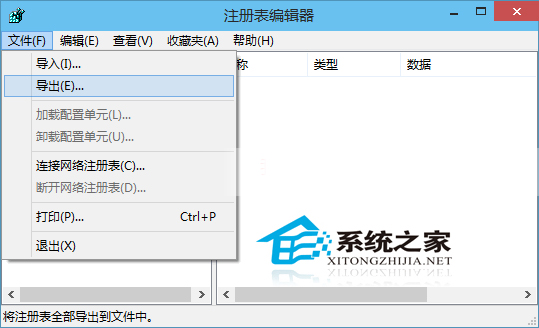
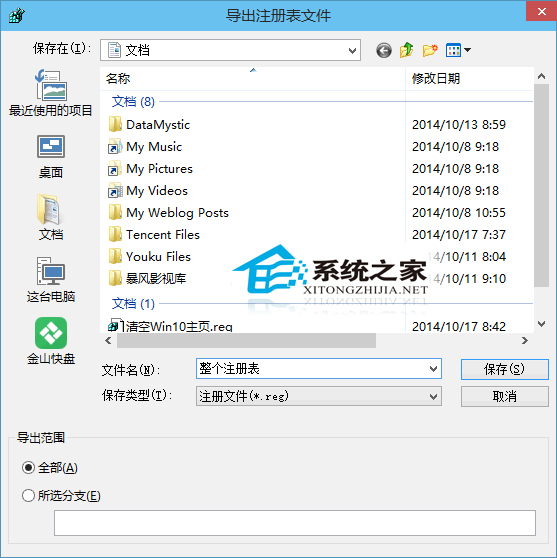
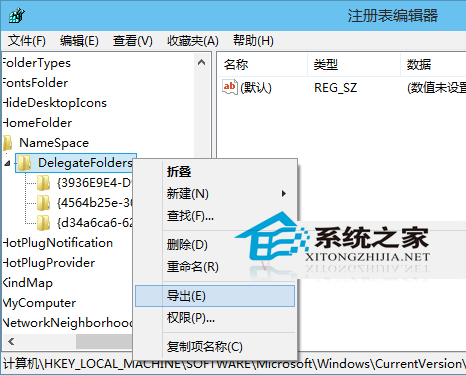
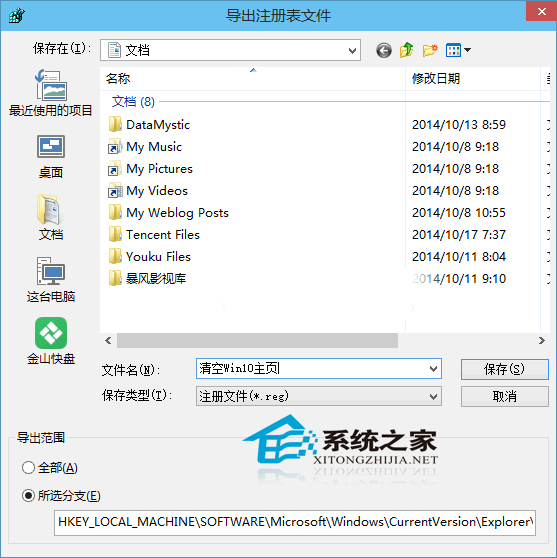
修改登錄檔前建議先備份,提供兩種方式:
regedit
FullBackup.reg
HKEY_CURRENT_USER\Software\MyApp
MyApp_Backup.reg
雙擊 .reg 檔 → 是 → 確定,即可將備份內容寫入登錄檔。單一分支備份檔案較小、還原精準不影響其他設定。
Win10 自訂磁碟分割區圖示:autorun.inf + .ico 打造專屬盤符視覺識別
登錄編輯器快速跳轉技巧:HKEY_LOCAL_MACHINE 與 HKEY_CURRENT_USER 互通
Win10 遠程桌面連接設置自定義分辨率教程
Win10 照片磚貼自訂背景色:三步打造專屬開始選單色系
Win10 提升 Intel 核顯性能?透過顯示晶片控制面板調教 3D/媒體/電源設定
支援 UEFI 電腦的 Win10 安裝 USB 隨身碟製作教學 (Rufus)
Win10 開啟 Aero 玻璃透明效果,讓工作列/開始選單半透明化
Win10 虛擬桌面完整指南:用途、快捷鍵、應用程式分組移動、多螢幕切換