工作列空白處右鍵 → 「搜尋」 → 「隱藏」。搜尋圖示將縮為放大鏡圖示,點擊後彈出搜尋框,不再佔用長條空間。
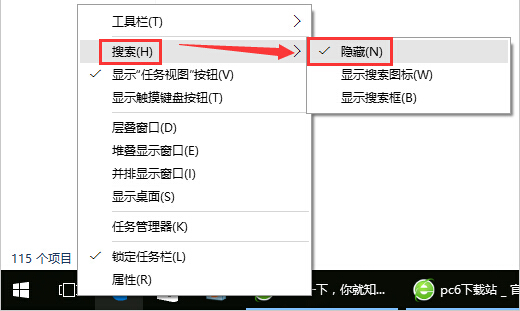
同樣可選「顯示搜尋圖示」或「顯示搜尋方塊」三種模式切換。
Win10 如何將揚聲器設為預設播放裝置?兩種方法:mmsys.cpl 指令與工作列音量圖示右鍵
Win10 藍屏缺少 atikmdag.sys?AMD 顯卡驅動衝突進安全模式卸載重裝
Windows 10 更新補丁儲存資料夾位置:C:\Windows\SoftwareDistribution\Download
Win10 同步個人化設定:設定 → 帳戶 → 同步處理您的設定 → 開關與細項控制
Windows 10 移除任務列「搜尋」與「工作檢視」按鈕註冊表教學
Windows 10 正式版開機慢?啟用快速啟動、停用開機啟動項、檢查驅動三步驟加速