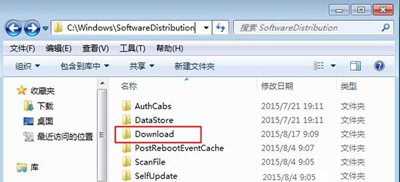
Windows Update 下載的更新套件預設儲存在 C:\Windows\SoftwareDistribution\Download。若某更新導致問題欲手動移除安裝檔,或想釋放空間,可直接清空此資料夾 (需先停用 Windows Update 服務)。
C:\Windows\SoftwareDistribution\Download
補充:已安裝的更新無法由此資料夾移除,需至「設定 → 更新與安全性 → 更新歷程記錄 → 解除安裝更新」操作。
Win10 磁碟機不顯示容量?兩種檢視模式快速切換
Windows 10 限制通知中心彈出訊息:兩種方法任你選
Win10 正式版啟用金鑰大全(專業版/企業版/教育版等)與 KMS 啟用指令
Win 10 設定 Windows 照片檢視器為預設看圖工具
收不到 Windows 10 升級推播?完整排除與解決方案
Win10 Microsoft Edge 瀏覽器設定教學:主頁、隱私清除、Flash 啟用
Win10 筆電通知區電源圖示消失找回教學:裝置管理員重置電池驅動 (同 22183/22227/22229 核心方案)
Win10 快速定位滑鼠指標位置:按 Ctrl 鍵顯示縮小圓圈不再找不到游標