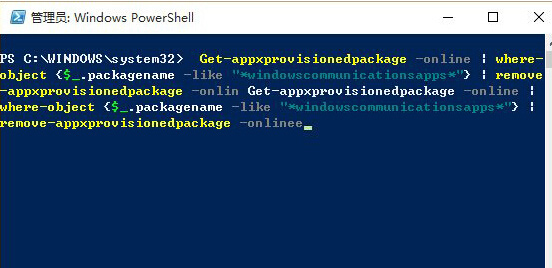
Win10 內建「郵件與行事曆」同步失敗,通常是 App 封裝損壞。PowerShell 移除佈建套件並從 Store 重裝即可修復。
Get-AppxProvisionedPackage -Online | Where-Object {$_.PackageName -like "*windowscommunicationsapps*"} | Remove-AppxProvisionedPackage -Online
此法適用於多數 UWP App 異常,只需替換套件名稱關鍵字。
Win10 如何啟用 Ctrl+Alt+Del 解鎖螢幕?註冊表 + 使用者帳戶控制雙重設定,防止遠程/軟體模擬解鎖提升安全性
Windows 10 安裝過程中建立本機帳戶的方法
Windows 10 解除安裝程式完整教學:設定介面與控制台雙管道操作
Win10 Edge 瀏覽器下載清單在哪裡?Ctrl+J 快速鍵或中樞按鈕開啟
Win10 快速啟動無法勾選?啟用「變更目前無法使用的設定」解決
刪除 Windows 系統更新安裝包釋放 C 槽空間兩種方法
Win10 UEFI + GPT 磁碟分區完整教學:diskpart 指令建立 EFI、MSR、主分區
Win10 9879 平板電腦啟用 Surface 風格開始畫面