什麼是側載模式?
側載模式允許使用者不經由 Microsoft Store,直接安裝測試第三方應用(包括 Android/App 應用移植版)。這對開發者、測試人員及進階用戶至關重要。
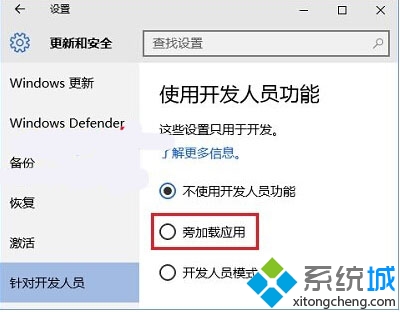
啟用方法
- 開啟「設定」→「更新與安全性」。
- 左側選擇「開發人員專用」。
- 在「側載應用」區域,選擇「側載模式」或「開發人員模式」。
意義與影響
- Windows 行動裝置無需「越獄」即可安裝第三方應用。
- 微軟推廣自家行動裝置生態的關鍵策略之一。
- 較 Win8 更簡單,無需複雜命令即可開啟。
注意
開啟側載模式會降低一定安全防護,建議僅在信任來源應用時啟用,平時可關閉。