右下角彈窗廣告通常由開機啟動程式引起,兩種解法:
msconfig → 「啟動」索引標籤 → 取消勾選可疑項目 → 確定重開機。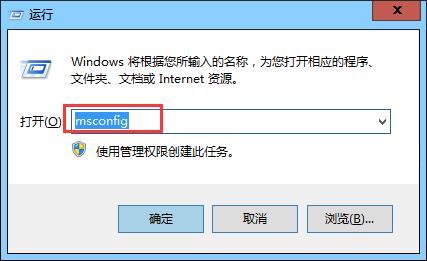
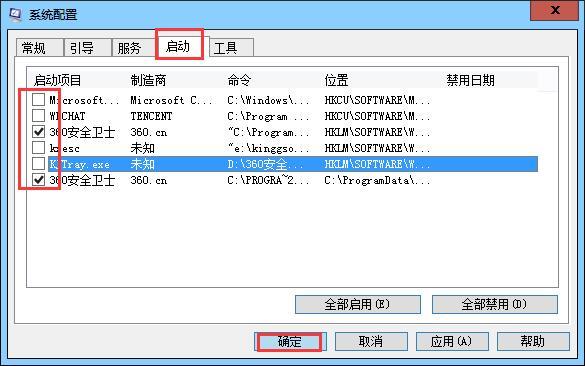
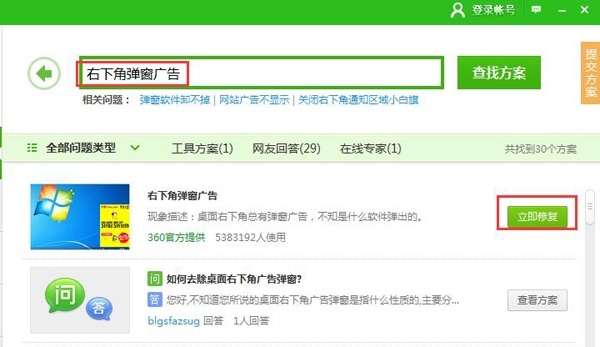
建議先用 msconfig 排查,若不確定哪項可疑再用 360 修復。
Windows 10 修改網卡 MAC 位址:查詢與裝置管理器修改法(同 ID 21050)
Win 10 執行《英雄聯盟》當機?官方崩潰補丁替換 Game 目錄下兩檔案修復
Win10 藍畫面 CRITICAL_STRUCTURE_CORRUPTION 八大排查步驟:硬體、驅動、軟體衝突、系統檔案修復
Win10 內建計算機完整使用教學:標準、科學、程式設計師、12 種單位換算
Windows 10 開機密碼完整設定指南:字元密碼、圖片密碼、PIN 碼三模式圖文教學
Win10 如何變更 DNS 伺服器位址(附常用公共 DNS 列表)