Windows XP Windows 7 Windows 2003 Windows Vista Windows 綜合教學 Linux 系統教學
Windows 10 Windows 8 Windows 2008 Windows NT Windows Server 電腦軟體教學

Win10 右鍵選單新增「加密」快速加密檔案/資料夾:登錄表 EncryptionContextMenu=1 一鍵啟用 EFS

編輯:Windows 10 系統介紹

Windows 內建 EFS (加密檔案系統) 可加密單一檔案/資料夾,預設需「內容→進階→勾選加密」多步驟。登錄表可加入右鍵選單:

登錄表設定

  1. Win+R → regedit。
  2. 導航至:
    HKEY_CURRENT_USER\SOFTWARE\Microsoft\Windows\CurrentVersion\Explorer\Advanced
  3. 新建 DWORD (32-bit) 值 命名 EncryptionContextMenu,數值設 1。
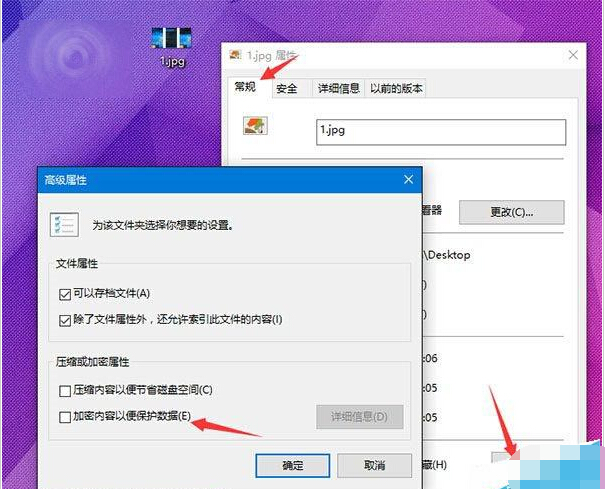
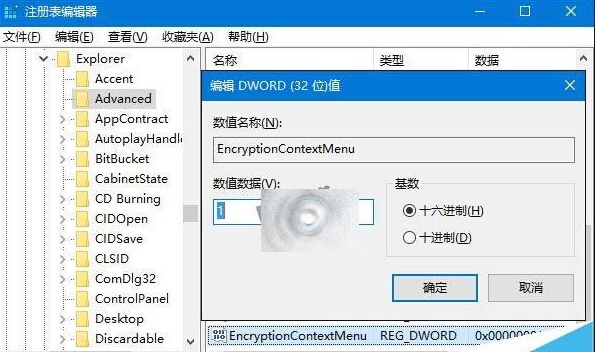
    檔案內容進階加密勾選 登錄表 EncryptionContextMenu=1
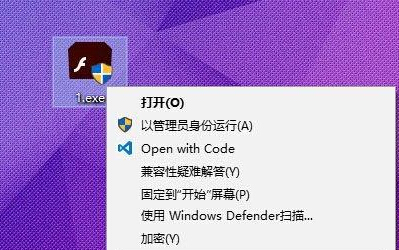
  4. 即時生效:右鍵任意檔案/資料夾 → 見「加密」選單;已加密項目顯示「解密」。
    右鍵選單出現加密解密

移除: 刪除 EncryptionContextMenu 鍵值即可。EFS 加密後其他帳戶/其他系統啟動均無法讀取,極適合保護機密資料。

Copyright © Windows教程網 All Rights Reserved