錯誤代碼 0x8024402f 通常代表用戶端與 Microsoft 更新伺服器連線異常,可能源於網路不穩、更新服務元件損毀或快取錯誤。微軟官方社群提供的一組重置指令可有效修復。
net stop CryptSvc
ren %windir%\system32\catroot2 catroot2.old
net start CryptSvc

net stop wuauserv
regsvr32 wuapi.dll /s
regsvr32 wups.dll /s
regsvr32 wuaueng.dll /s
regsvr32 wucltui.dll /s
regsvr32 wuweb.dll /s
regsvr32 msxml.dll /s
regsvr32 msxml2.dll /s
regsvr32 msxml3.dll /s
regsvr32 urlmon.dll /s
net start wuauserv

regsvr32 softpub.dll /s
regsvr32 initpki.dll /s
regsvr32 mssip32.dll /s
regsvr32 wintrust.dll /s
regsvr32 dssenh.dll /s
regsvr32 rsaenh.dll /s
regsvr32 gpkcsp.dll /s
regsvr32 sccbase.dll /s
regsvr32 slbcsp.dll /s
regsvr32 cryptdlg.dll /s
regsvr32 jscript.dll /s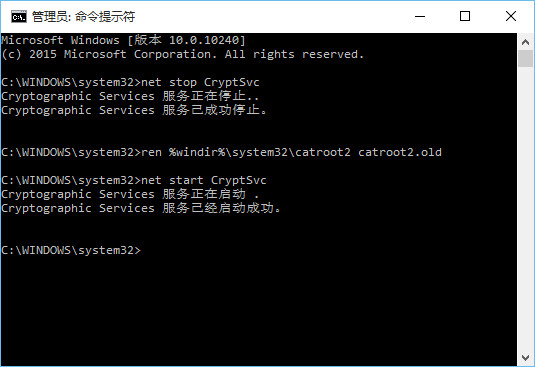
sfc /scannow 修復系統檔案。