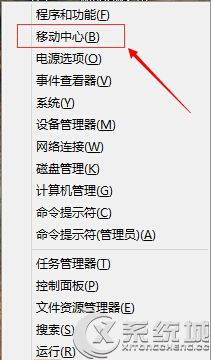
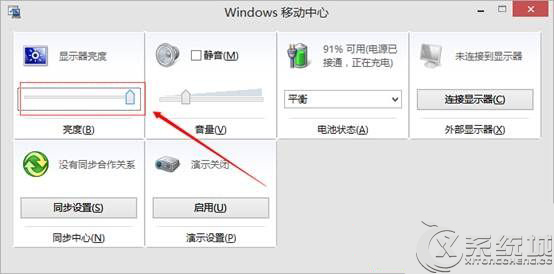
亦可在「設定」→「系統」→「顯示」中調整亮度,或使用筆電鍵盤上的亮度快捷鍵(通常為 Fn + F1/F2 等)。
Win10 更新/商店打不開 80072efd 錯誤?關閉安全軟體或加入 Microsoft 更新網址白名單
Win10 右鍵選單樣式修改:同 22059/22011 登錄 ImmersiveContextMenu 切換傳統/現代樣式
Win10 預覽版 ISO 鏡像整合語言包製作教學:DISM 指令掛載 WIM、加入語言包、設定預設語言、重新封裝 ISO
Win10 好不好用?核心新功能體驗:虛擬桌面、強化分螢幕、全新開始選單、跨裝置統一
Windows 10 應用程式商店打不開錯誤 0x80072EFD?檢查 Proxy 與防火牆服務
Win10 Mobile 預覽版 14926 已知問題與解決:PIN 鍵盤不顯示、SIM 卡無法識別 → 硬體重置 (硬重置) 恢復