Windows XP Windows 7 Windows 2003 Windows Vista Windows 綜合教學 Linux 系統教學
Windows 10 Windows 8 Windows 2008 Windows NT Windows Server 電腦軟體教學

Win10 升級後 SVN 圖示不顯示?登錄表重命名 ShellIconOverlayIdentifiers 修復

編輯:Windows 10 系統介紹

升級 Win10 後 TortoiseSVN 圖示疊加層不顯示,因 Windows 限制圖示疊加層上限 15 個,升級後順序變更導致 SVN 索引超出範圍。透過登錄表重命名優先順序修復。
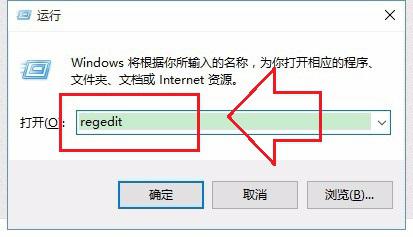
修復步驟:

  1. Win+R → regedit
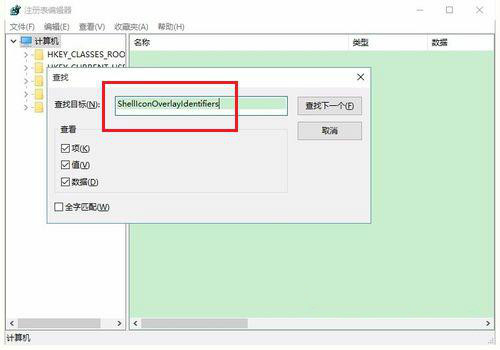
  2. Ctrl+F 搜尋 ShellIconOverlayIdentifiers
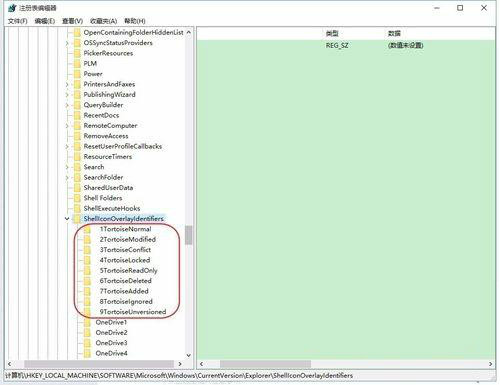
  3. 找到 9 個 SVN 相關項目(1TortoiseNormal、2TortoiseModified...)
  4. 逐一重命名,在名稱最前加一個空格(如 1TortoiseNormal)
  5. 重開機生效

原理:Windows 依字母順序載入前 15 個圖示疊加層。加空格使 SVN 項目排在前面,優先被載入。此法同樣適用於其他圖示疊加層衝突(如雲端同步軟體)。

Copyright © Windows教程網 All Rights Reserved