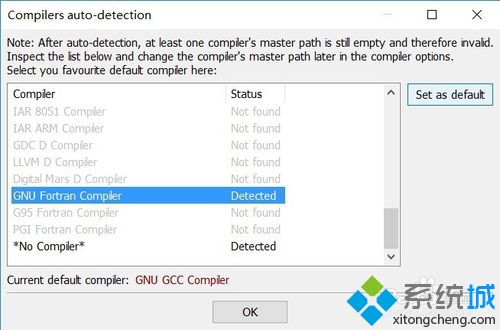
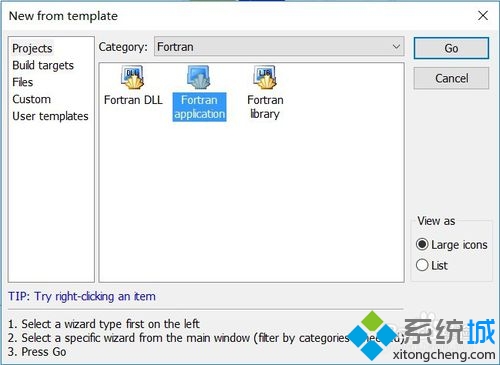
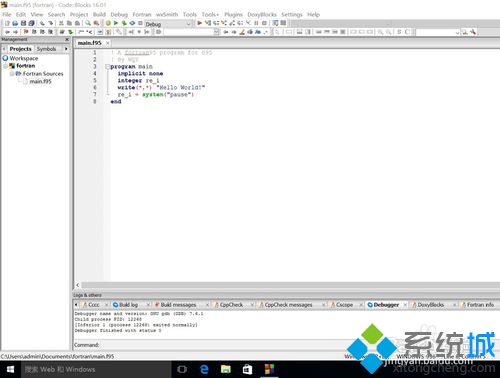
在 Windows 10 上使用 Fortran 編程,需安裝 Fortran 編譯器(如 gfortran、Intel Fortran),設定為預設開發環境,建立標準 Fortran 專案檔,編寫程式碼於 main.f95,按 F9 編譯執行。
main.f95
常用編譯器:GNU Fortran (gfortran)、Intel Fortran Compiler、Silverfrost FTN95 等。
Windows 10 圖片縮略圖不顯示?關鍵在「檢視模式」設定
Win10 能自動更換壁紙嗎?使用傳統介面實現完整功能
Win10 查看筆電電池損耗度:透過第三方工具讀取電池健康資訊
Win10 系統共享打印機設置圖文教程:六步輕松實現局域網打印
Windows 10 檔案總管「主頁」隱私清理:透過登錄移除常用資料夾、最近使用檔案、收藏夾顯示
什麼是 Win10 會員版本?手把手教你免費加入 Windows Insider 計畫
Windows 10 最低系統需求:1GHz CPU、1/2GB 記憶體、16GB 硬碟空間
Win10 藍牙在哪裡?開啟、關閉、確認硬體支援完整指南