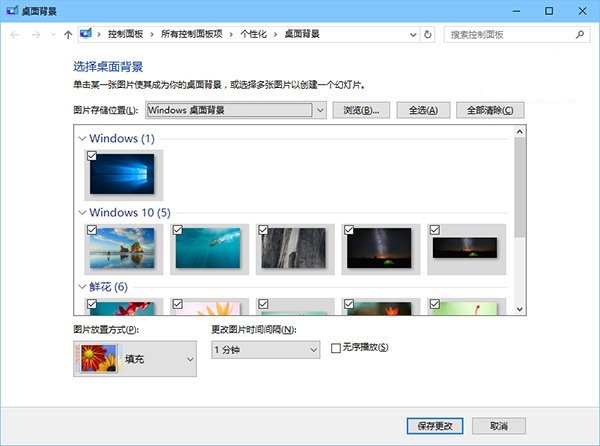
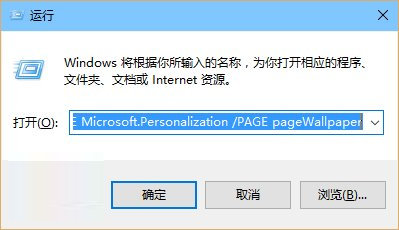
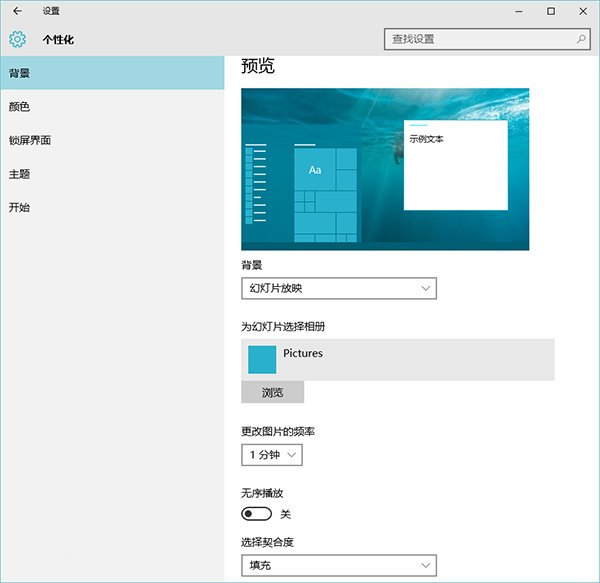
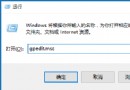
Win10 現代化介面的桌面背景設定功能尚未完善,自動更換壁紙選項有限。透過呼叫傳統版控制台可獲得完整功能,包括系統內建壁紙分類選取與靈活的輪換間隔設定。
%windir%\System32\control.exe /NAME Microsoft.Personalization /PAGE pageWallpaper
新版介面需手動定位壁紙資料夾,且間隔選項僅 6 個,無隨機播放功能。傳統介面對頻繁更換壁紙的使用者更友善。
Win10 跑老遊戲不相容?右鍵「相容模式」選舊版 Windows 即可執行
Win10 無線網卡驅動異常修復圖文版:手動指定兼容驅動覆蓋安裝(含卸載重裝流程)
Win10 關閉 Cortana 小娜語音助手(需 10074 以上版本)
刪除 Win 10 開始功能表程式資料夾繞道法 (ProgramData 路徑)
Win10 找不到「睡眠」選項?群組原則啟用待機狀態 (S1-S3) 找回
Win10 開始功能表無法開啟?重啟 DWM 進程即可修復
Win10 開始選單打不開/消失?兩大修復法:控制台輸入密鑰獲取新功能、或任務列屬性勾選「使用開始選單」
Windows 7 升級 Windows 10 出現錯誤 0xC1900101-0x30017?驅動程式不相容是主因