Windows XP Windows 7 Windows 2003 Windows Vista Windows 綜合教學 Linux 系統教學
Windows 10 Windows 8 Windows 2008 Windows NT Windows Server 電腦軟體教學

Win10 IE11 提示未安裝 Flash Player?修復註冊表與重新註冊 OCX

編輯:Windows 10 系統介紹

Windows 10 整合 Flash Player 於 Edge/IE11,不支援獨立安裝。若 IE11 提示缺少 Flash,通常為 C:\Windows\System32\Macromed\Flash 內檔案損毀或註冊失效。需清除舊檔、複製官方檔案並重新註冊 Flash.ocx。

修復步驟

  1. 刪除 C:\Windows\System32\Macromed\Flash 內所有檔案(若無法刪除,進安全模式或 WinPE 強制覆蓋)。
  2. 下載對應版本 Flash Player 套件(32 位元/64 位元),解壓檔案複製到上述資料夾。
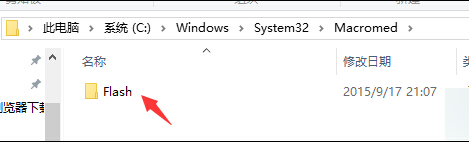
    64 位元系統還需複製到: C:\Windows\SysWOW64\Macromed\Flash

Flash 資料夾路徑 32/64位元

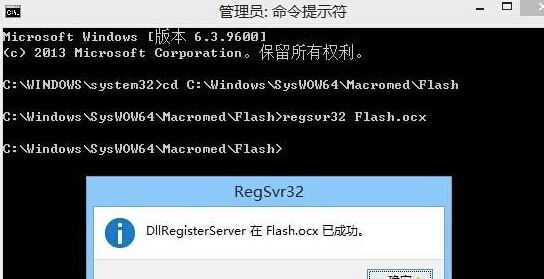
  1. 以管理員身分執行「命令提示字元」。
  2. 依序執行:
    cd C:\Windows\System32\Macromed\Flash
    regsvr32 Flash.ocx
    cd C:\Windows\SysWOW64\Macromed\Flash (僅 64 位元)
    regsvr32 Flash.ocx

regsvr32 註冊 Flash.ocx

  1. 重開機測試 IE11 Flash 內容是否正常顯示。
注意: Adobe 已於 2020/12/31 停止支援 Flash Player,現代網站已全面移除 Flash 內容。Windows 更新 (KB4577586) 已移除系統內建 Flash。本文僅供舊版系統維護參考,建議改用支援 HTML5 的現代瀏覽器。
Copyright © Windows教程網 All Rights Reserved