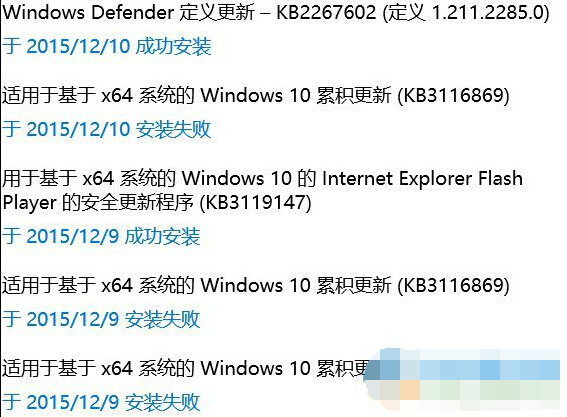
安裝 KB3116869 導致黑屏,解除安裝後恢復。清理 Windows Update 快取後重新下載安裝可避免損毀檔案導致的問題。
services.msc
C:\Windows\SoftwareDistribution\DataStore
此法適用多數特定補丁安裝失敗/黑屏/藍屏情況,核心在於移除損毀的快取檔案強制重新下載完整套件。
Win10 檔案總管卡死怎麼辦?任務管理員重新啟動總管進程 3 秒搞定
Win10 如何啟用來賓帳號?圖文教學讓你輕鬆開放臨時使用權限
Windows 10 韓文介面切換為繁體中文:控制台語言設定教學
Windows 10 裝置管理員在哪?兩種快速開啟方法圖解
Win10 直接永久刪除文件不進回收站:兩種方法詳解
Win10 移除圖示右上角箭頭 (捷徑標誌)?取消資料夾壓縮/加密屬性
Win10 光碟機消失/無法使用?修改登錄找回光碟機圖示與功能
Windows 10 激活工具與金鑰大全:官方安裝金鑰、KMSpico、HEU KMS Activator、小馬 OEM8 使用指南