適用版本
Win10 早期預覽版 (10074),新版已在設定介面直接提供縮放調整。
登錄調整法
- Win+R →
regedit。
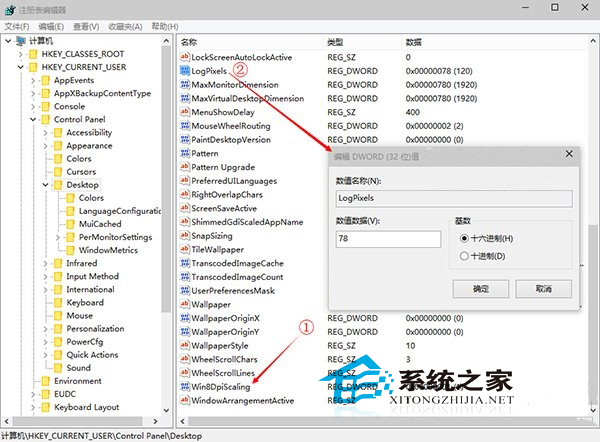
- 瀏覽:
HKEY_CURRENT_USER\Control Panel\Desktop
- 修改兩值:
- Win8DpiScaling:設為 1 (啟用自訂 DPI)。
- LogPixels:設定 DPI 值 (十六進位/十進位/百分比):
- 96 (0x60) = 100%
- 120 (0x78) = 125%
- 144 (0x90) = 150%
- 登出/重開機生效。
現代版本
Win10 正式版請直接用:設定 → 系統 → 顯示 → 「縮放與版面配置」調整百分比 (100%~175% 等)。