Windows XP Windows 7 Windows 2003 Windows Vista Windows 綜合教學 Linux 系統教學
Windows 10 Windows 8 Windows 2008 Windows NT Windows Server 電腦軟體教學

Win10 照片檢視器背景顏色修改:註冊表自訂 BackgroundColor 十六進制值

編輯:Windows 10 系統介紹

Win10 照片檢視器預設白色背景刺眼?註冊表新增 BackgroundColor DWORD 值,可自訂背景顏色 (如黑色 ff000000),保護眼睛。

操作步驟

  1. Win+R → regedit。
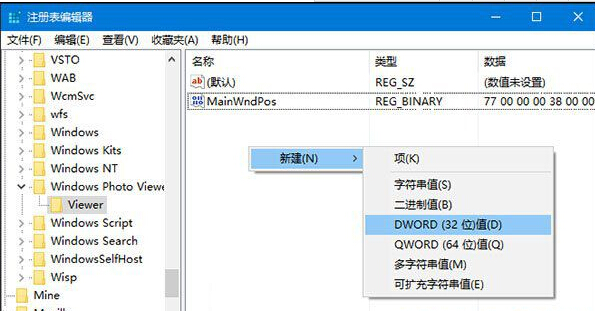
  2. 瀏覽至:
    HKEY_CURRENT_USER\Software\Microsoft\Windows Photo Viewer\Viewer
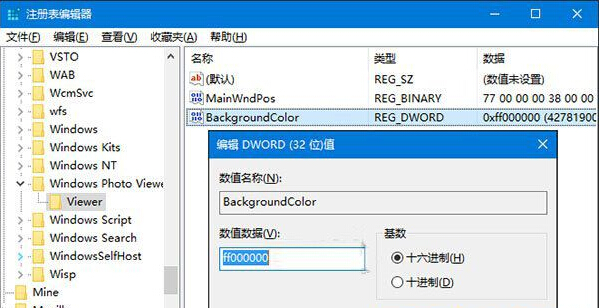
  3. 右側新增 DWORD (32-bit) 值:BackgroundColor。

  1. 雙擊修改數值:十六進制,前綴 ff + 顏色代碼 (如黑色 ff000000、深灰 ff333333、藍色 ff0000ff)。
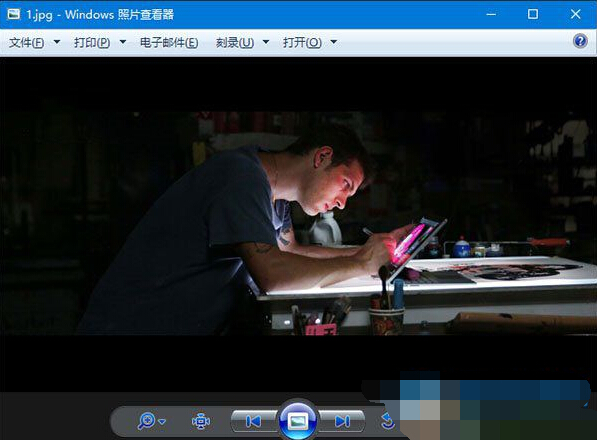
  1. 重新開啟照片檢視器即見效果:

顏色代碼可用線上調色盤取得 (格式 RRGGBB),前綴 ff 代表完全不透明。

Copyright © Windows教程網 All Rights Reserved