方案一:切換 Microsoft 帳戶
- Microsoft 官網註冊/登入帳戶。
- 設定 → 帳戶 → 改用 Microsoft 帳戶登入。
注意: 切換後預設使用 Microsoft 帳戶登入。切回本機帳戶將導致內建應用程式再次無法使用。
方案二:群組原則啟用內建管理員核准模式
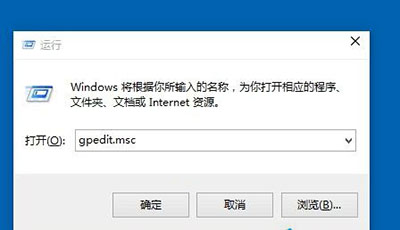
- Win + R →
gpedit.msc → Enter。
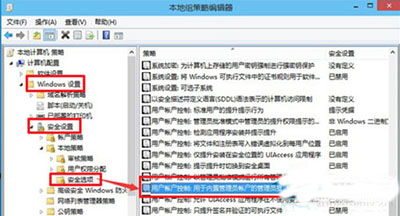
- 電腦設定 → Windows 設定 → 安全性設定 → 本機原則 → 安全性選項。
- 「使用者帳戶控制:用於內建管理員帳戶的管理員核准模式」(預設停用)→ 「啟用」→ 「確定」。
選擇建議
- 接受雲端綁定 → 方案一,啟用完整同步服務。
- 堅持本機帳戶 → 方案二,保留隱私與本地控制權。