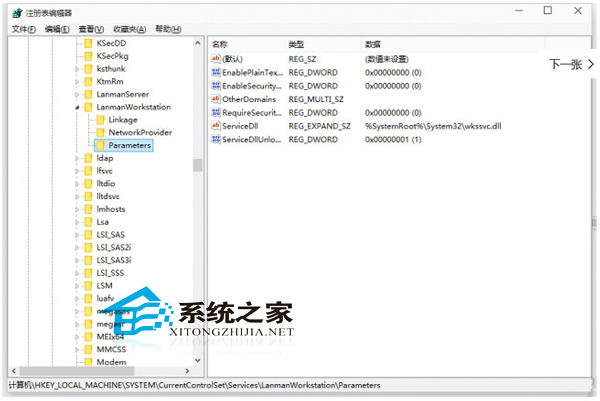
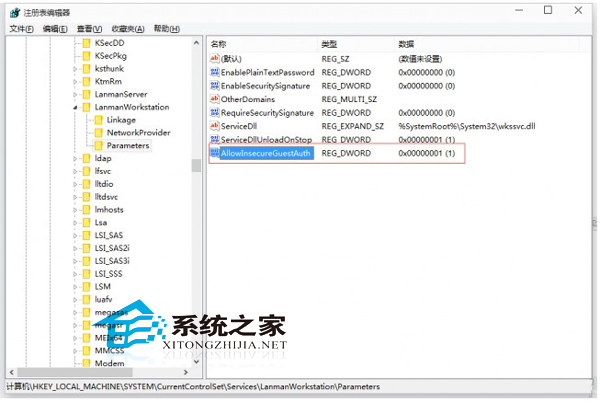
Win10 無法存取路由器 USB 共享硬碟 (SMB 訪客存取被預設阻擋)。
regedit
HKEY_LOCAL_MACHINE\SYSTEM\CurrentControlSet\Services\LanmanWorkstation\Parameters
此設定允許不安全的訪客登入 (SMB 1.0/不加密),僅建議家庭/受信任區域網路使用,企業環境請配置正規 SMB 簽署/加密存取。
Win10 磁碟檢查結果在哪看?事件檢視器查詢 CHKDSK 日誌完整教學
Win32 轉制 UWP (Project Centennial) 七大優勢:動態磚、通知、乾淨安裝、商店分發……
Win10 更換桌面背景圖片完整教學:右鍵快速法與個人化設定法雙管道
Windows 10 升級後 360 瀏覽器無法上網?四大常見問題與解法總整理
Win10 螢幕亮度調不了?三大解法從簡單到徹底
Win10 收不到推播更新怎麼辦?清理快取執行 wuauclt.exe /updatenow 強制檢查更新
Win10 用 bat/bcdedit 實現開機 F8 進安全模式 (同 22627)
Win10 任務列通知區域圖示異常?重置 IconStreams 與 UserStartTime 徹底修復