Windows 10 免費升級期內,微軟採分批推送機制,許多用戶迟迟未收到「獲取 Windows 10」圖標通知。若你的裝置符合升級條件卻遲無動靜,可嘗試以下官方腳本強制觸發相容性檢測與 GWX 推送流程,讓升級通知主動送上門。
執行腳本前,請先確認系統已安裝對應的 KB 更新,否則相容性鑑定器無法啟動:
KB3035583 與 KB2952664KB3035583 與 KB2976978可透過管理員權限命令提示符輸入 dism /online /get-packages | findstr <KB編號> 驗證是否已安裝;若顯示「套件識別碼」即代表已就緒。
REG QUERY "HKLM\SOFTWARE\Microsoft\Windows NT\CurrentVersion\AppCompatFlags\UpgradeExperienceIndicators" /v UpgEx | findstr UpgEx
if "%errorlevel%" == "0" GOTO RunGWX
reg add "HKLM\SOFTWARE\Microsoft\Windows NT\CurrentVersion\AppCompatFlags\Appraiser" /v UtcOnetimeSend /t REG_DWORD /d 1 /f
schtasks /run /TN "Microsoft\Windows\Application Experience\Microsoft Compatibility Appraiser"
:CompatCheckRunning
schtasks /query /TN "Microsoft\Windows\Application Experience\Microsoft Compatibility Appraiser"
schtasks /query /TN "Microsoft\Windows\Application Experience\Microsoft Compatibility Appraiser" | findstr Ready
if NOT "%errorlevel%" == "0" ping localhost >nul &goto :CompatCheckRunning
:RunGWX
schtasks /run /TN "Microsoft\Windows\Setup\gwx\refreshgwxconfig"
ReserveWin10.cmd,存檔類型選「所有檔案」C:\Temp 資料夾並將檔案存放於此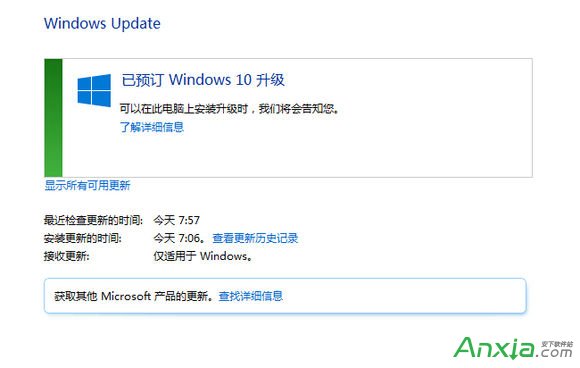
腳本會先查詢登錄檔判斷是否已有升級體驗指標,若無則寫入 UtcOnetimeSend 觸發「Microsoft 相容性鑑定器」排程任務,待掃描完成(狀態顯示 Ready)後再啟動 gwx\refreshgwxconfig 重新整理 GWX 設定,強制讓伺服器推送升級預約通知。
提示:若執行後仍未出現通知,請檢查 Windows Update 服務是否啟用,並確認網路可連線微軟更新伺服器。